Toshiba Chromebook Highlights

Google’s Chrome Browser has become one of the most used browsers in the world. Chrome has evolved into its own operating system, Chrome OS. The Chrome OS is, in simple terms, a computing environment based entirely on the browser environment. It has its own app store and is fully integrated with all of Google’s sign-in services, including Gmail, Calendar, Google plus and Google Drive.

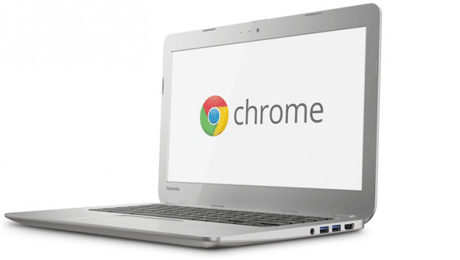
Chromebooks are notebooks that run on the Chrome OS platform. The keyboard is tweaked for shortcuts related to Chrome functions, and it’s an ideal second PC for someone that uses online and Google services regularly.

We’re excited to now carry the Toshiba Chromebook, with a 13.3 inch screen, an Intel dual core processor, 2GB RAM and 16GB solid state storage. For connectivity there is a full size HDMI output, two USB three ports, and an SD Card slot. The Chromebook stays connected online via a high speed N wireless LAN. The battery will last close to 10 hours, and it also has a webcam.

Specs aside, there are quite a few reasons to consider this Chromebook as your backup or second notebook, especially if you are already a google account user.

First, it’s inexpensive. If you compare the price of this to any other notebook in our range, it will easily top the list for best value thirteen inch notebook.. And for keyboard size, it really is money well spent if you are a heavy keyboard pounder while online.

Despite the price difference, one area that Chromebooks can go toe-to-toe with any other notebook or Ultrabook is boot up time. Chrome OS is very lean and isn’t much more than launching a more sophisticated version of the browser, albeit with a file management and total PC settings support system. For quick status updates or email checks, the speed is terrific.

You can share your Chromebook with confidence as other users can set up their own profile, or even as a guest, where all their browser history and downloads are deleted at logoff.

Just like the Chrome Browser, updates are pushed to the Chromebook without the user needing to get involved – no patches or service packs.

Using a Chromebook pretty much depends on you using cloud based storage. One benefit is that if you happen to misplace your Chromebook, or a stranger picks it up, there is no locally stored data – you could literally pick up a new Chromebook, sign in and you’d be able to pick up right where you left off. And right now, owning this Chromebook gives you 100GB of Google Drive Storage free, for two years.

Even if you are offline and need to work on a document, this is possible with some major apps now available to use offline, including Google Docs, Gmail, calendar, as well as a whole set of third party apps and games, the list of which is growing all the time.

That’s the Toshiba Chromebook – great value, highly productive and an awesome second notebook.
 

Beko French Door Highlights

http://www.youtube.com/watch?v=ok0IG1jBnao

This is 584 litre French door fridge from Beko has some great features that help you keep your fridge items organised and extend the life of your fruit and vegies.

So let’s start on the outside of the fridge. This is a stainless steel fridge, and will add a bit of sparkle and class to any kitchen. And if you have young kids, you just know they’ll have their fingers all over this fridge. Great thing is it’s fingerprint free because of a special coating so it stays clean and shiny.

Then we have the water dispenser, which can accommodate a kids sports bottle – very convenient if you have young ones leaving for their sports event, just fill up and go.

Now as you can see we have the fridge area on the top and the freezer area on the bottom. Now did you know that many fridges have one cooling system for both areas, which means they share the same air circulation? Not this Beko. The cooling system is actually independent for the fridge and freezer areas. This controls the humidity levels better and stops odours getting from one area to another. This means longer lasting fruit and vegies.

This is not just a French Door fridge, it’s also a four door fridge, which has been designed with some very cool features. The big one is here on the bottom right hand corner. Now this is usually paired with the left hand door to make two 77 litre freezers. But if you need extra cooling space, get this – you can convert that compartment into a fridge area. Great if you have lots of cool snacks or cold meats for a party coming up.

Once you need it as a freezer, just a press of a button on this digital display and it’s back to freezing. You can see here the digital panel also lets you control the operating temperature of the fridge and freezer. Now speaking of freezing, this is the fresh freeze compartment. Put your fresh food in there and it will rapidly freeze, so the nutrition and flavor are preserved.

Because it’s french door there is a huge wide space that can be used for really wide platters and big pots – great for parties and family events.

The fridge area has active fresh blue light. Now it’s been a while since I was at school, but do you remember the word “photosynthesis” thrown around in science? Okay, so this blue light technology that Beko uses actually helps the fruit and vegetables, which have grown as a result of sunlight, continue to stay fresh and actually prolongs the life of your fruit and vegies.

So that’s the Beko fridge, family sized, versatile and keeping your fresh food at its optimum for longer. Visit any store or purchase online right now!

Galaxy NotePro and TabPro Tablets Coming From Samsung

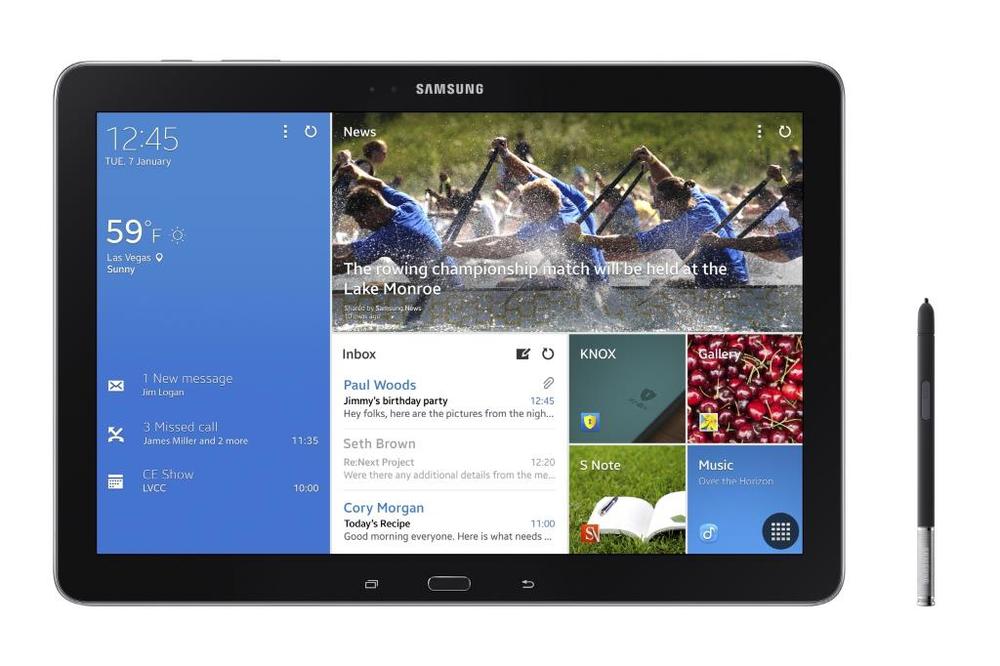
The Galaxy range of tablets from Samsung are now well known for their versatility and range, catering for different age groups and professions and entertainment applications. Samsung are clearly not sitting still, as they announced another 4 models that will be launching in the next few months. These include the Galaxy NotePRO (12.2-inch), which comes equipped with an S-Pen, and the TabPRO range (12.2, 10.1, 8.4-inch).

The Galaxy NotePRO and TabPRO series are all about premium style and powerful performance in a tablet. Samsung have thought of every type of user case scenario, whether work, play or education. The Samsung Galaxy NotePRO and TabPRO models feature a crystal-clear, WQXGA display, which is a 2560 x 1600 resolution. In comparison, Full HD TV’s have a 1920 x 1080 pixel count.

The Samsung Galaxy NotePRO and TabPRO 12.2-inch display is actually the first of its kind in the world, and that size screen makes it ideal for both content creation and consumption. With a larger viewing area, the 16:10 screen allows users to enjoy stunning Full HD video play and see even more information when needed. According to people who have had their hands on this unit, they actually feel very light and potable given the screen size.

Samsung has designed a new screen interface called the Content Home, with allows real tailoring of the content on a dashboard that automatically updates with news or social feeds that are set up. Frequently used apps can also be placed on this screen for instant access. The benefit of the larger screen size is that it is much closer to that of a traditional paper magazine size, so reading mags or ebooks are even more comfortable and enjoyable.
At that size, you might thinking  that this size tablet might be able to reaplce your notebook. And you know what? You could be right.

The Samsung Galaxy NotePRO and TabPRO (12.2) come equipped with a variety of productivity tools to help you manage both personal and professional sides of tablet use.
Multi Window enables users to split the screen up into four different windows and an innovative, Virtual Keyboard has enough space to type comfortably, with a subtle vibration on each virtual key press delivering  a more realistic typing experience.

The Samsung S Pen has been a huge point of difference for the Note ranges, and it’s also included in the Galaxy NotePRO.  Features such as Action Memo, Scrapbook, Screen Write and S Finder deliver a more responsive, productive and overall efficient tablet experience. In addition, a great feature called Pen Window enables users to simply draw a window of any size on the screen, and instantly access unique in-application features such as YouTube or a calculator.

If you’re using the tablet as an extension of your home or work desktop or notebook PC, you can easily access and control that PC directly through the Galaxy NotePRO or TabPRO with the Remote PC app so you can edit and save files remotely.

Just like the current range of Galaxy tablets, the upcoming Samsung Galaxy NotePRO and TabPRO line will come in both Wi-Fi and Wi-Fi with 4G. You’ll have a choice between the 12.2-inch Galaxy NotePRO that comes with an included S Pen, plus the 12.2-inch Galaxy TabPRO, Galaxy TabPRO 10.1-inch and 8.4-inch without the S Pen.

Here at Bing Lee, we’re excited to see these appear in our stores. We’ll keep you in the loop as a release date gets closer.

Have a great weekend!

Fitbit Flex – The Body’s Black Box Recorder

At the recent CES in Las Vegas, “wearables” was the category on everyone’s tongue, and it will be very interested to see how this category develops, and what it’s really going to mean in terms of changing our lifestyles and habits.

Being a runner, I’ve been using so called wearables for a long time now. In fact I had one of the original Polar heart rate monitor watches that had a pod that went on your foot to measure your movement. Now it’s a Garmin GPS watch with heart monitor.

The thing with these performance wearables is that they are not really permanent fixtures – you put them on when you need them and take them off when you’re not doing strenuous activity. The rise of the so called activity tracker is something quite different – unobtrusive and ever present.

I got myself a Fitbit Flex to primarily track my sleep patterns, as I feel like I’m quite a restless sleeper. Because it measures movement, it can provide some really good data on the period that you would be most unaware, that is, sleep time. As it turns out, I sleep for around 6 hours and toss and turn around 10 times a night (that needs to improve).

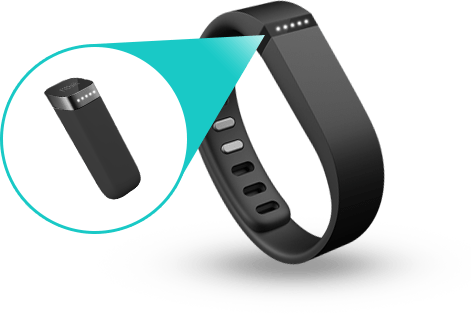
Because there’s no actual GPS built into the wristband, it approximates the amount of steps, distance and calories by measuring your movement.  It provides a really good baseline for your daily habits, which leads to this sort of “gamification” of my waking life.

I’ll look at the Fitbit app once in the morning and then again in the early afternoon to see where I’m at. You can also just double tap the band to get a basic progression bar. If I feel like I haven’t walked enough steps to make the day’s quota, I’ll consciously move around more or stop putting off that run around the local streets and get out there.

While I was running, the wristband vibrated, which means that I’d completed the day’s goal, and that is a strangely satisfying moment – like finishing the next level of whatever game you’re currently into.

I actually like this idea of being able to constantly tap into this constant telemetry feed of myself. I feel like it’s comparable to the black box recorder on planes. For example, if something did happen to me, I fell ill or collapsed (knock on wood!), medics or family could synch my Fitbit to see how the last few days were for me. Was I over exercising, was I having adequate sleep, were my activity levels very different to the norm? These things would normally not be able to be quantified to any accurate level, but this data could be passed on to a medical team.

The Fitbit Flex works for me because it’s on me all the time and serves a practical purpose for motivation and information; doesn’t require daily charging so there’s no battery anxiety; and is small and light enough that it doesn’t really register. And that’s probably the test of a good wearable.

Home Networking Made Easy with Netgear

http://www.youtube.com/watch?v=YV3ywbavyTA

Have you outgrown your home network?  Think about how many devices you were using 2-3 years ago and how many you are using today.  Today’s digital homes have an average of 10 WiFi devices with multiple family members online at the same time, web surfing, music streaming, watching video, on devices from smartphones and tablets to smart TVs and game consoles.

This can lead to frustration when experiencing slow connection speeds, buffering, gaming lag, poor WiFi range and WiFi dead zones. (Could show shot of buffering on YouTube video or no/1 bar on WiFi signal of tablet/smartphone)

WiFi technology has evolved greatly overly the last few years and a WiFi network today needs to be able to handle all of your mobile and entertainment devices.  Upgrading your network is easy and will allow you to use more devices anywhere in the home, anytime you want.

We’re going to demonstrate how easy it is to upgrade and set up your home wireless network.

Create a futureproof home network by upgrading to the latest in WiFi technology with a NETGEAR next generation Wireless AC product.    You’ll experience greater wireless coverage, faster wireless speeds and the ability to easily connect more devices. All NETGEAR AC products are NBN ready.

Now, upgrading your home network is easy. In just a few simple steps you can easily upgrade your modem router and overcome your network problems. NETGEAR offer simple CD less installation for all their new networking gear.

The first thing you will need is an active internet connection with a service provider. Unbox the router, taking out the main product and the power supply. Then, install your modem or modem router. Today we are using a Netgear D6200. Connect the router to your internet service – You can connect either directly to an ADSL line or to a fibre/cable modem.

Connect the power adapter to the router and plug the power adapter into an outlet. Wait until the Wi-fi LED turns solid blue. Then, connect a computer. You can do this with a cable or connect wirelessly. You would use an Ethernet cable to connect your computer to an Ethernet port on your router, or connect wirelessly by using the preset wireless security settings on the label on your router.

NETGEAR Genie is an easy step by step guide to help you set up your network quickly and correctly. It is your home network dashboard that you can access via computer, Tablet or smartphone.

Genie lets you easily view, manage and control your entire home network, and can also help to fix common network problems should they arise. NETGEAR Genie makes home networking easy. Should you need it, NETGEAR also offer a 24/7 support line to assist you further. Now you’re connected!

By upgrading your wireless home network you will experience faster connection speeds, greater range and improved online experience on all of your connected devices throughout your home.

Futureproof and maximise your wireless network today and upgrade to a NETGEAR AC wireless network.

Come and visit our Bing Lee Networking team to help you get the best out of your wireless network!

WD Mycloud Personal Cloud Storage

http://www.youtube.com/watch?v=ruUTS4xQ8gM
Today I’d like to show you a new way to save and organise your digital life plus access your stuff from anywhere on any device. Introducing WD’s newest personal cloud storage offering, MyCloud.

Mycloud gives you complete control over your personal content, allowing you to keep it safe at home, yet always with you. Unlike public cloud solutions that either backup or store your photos, videos and files on a remote server, Mycloud keeps your stuff secure in your home network.

There are no monthly fees and you get terabytes, not just gigabytes of storage. Because 1 terabyte holds up to two hundred thousand photos or a hundred and twenty hours of video, and who can store all that with just gigabytes.

Mycloud also comes loaded with a dual core processor for the performance you need to stream media seamlessly, and transfer files without skipping a beat. It also has a USB three expansion port to add capacity to your personal cloud.

With MyCloud, it’s easier than ever to install and manage your personal cloud storage. To get started, simply plug your MyCloud to your wifi router. Download the My Cloud app and connect to the drive, that’s all you need to do to be up and running in seconds. The WD websitewww.wd.com/setup will walk you through more advanced features via step by step how to tutorials. Here you can also access all the software you need to support your My Cloud.

Once you are set up, it’s a breeze to save your stuff in one central location. Just drag and drop the files that you want to save on your personal cloud using the MyCloud app for your desktop. This app keeps your computer connected to your personal cloud no matter where you are, whether you’re on a mac or a PC. From your app you can easily manage and organise your files and share direct links to specific photos, videos, folders and even presentations via email either as a link to that file or folder or the file itself.

Backing up your data is extremely important. If your computer has issues, you know that the things that are really important to you are safe. Mycloud works seamlessly with your mac or PC computer to save and wirelessly back up your files on your home network.

For PCs, WD’s backup software, WD Smartware Pro, makes it easy to protect your personal content. Simply select the files you want to back up Select your Mycloud to back everything up to, and choose your backup schedule. It’s really that easy.

With the Mycloud dashboard you have a clear view of your drive’s status at anytime. You can also share your photos, videos and documents with family and friends, and customise how these users access your drive, so they only see the shared folders you want them to see.

Being able to access and see what important to you when you’re at home is ordinary. Being able to access and share those memories anywhere in the world is extraordinary. With WD’s free Mycloud apps, all your personal content on your drive is available to you on your smartphone or tablet wherever you are.

Once the Mycloud app installed on any iOS, Android or windows phone device, you can view your folders, share your photos with friends, watch a movie on your ipad, and stream your music library. If you’re going on a trip or even getting on an airplane, you can download files directly to your phone or tablet and watch them when you’re not connected.

Most of us take tons of video and photos on our smartphones and tablets which takes up a lot of memory on your mobile device. With the Mycloud app you can instantly free up space on your phone by directly uploading photos and videos directly to your drive at home.

If you’re a dropbox, sky drive or google drive user, you can access your account within the mycloud mobile app and share files between your cloud service and your own personal cloud. There’s no need to pay extra fees for more capacity. Get the most out of your public cloud and your personal cloud all on one device. Mycloud also works with other public clouds including google drive and skydrive.

There you have it, WD’s Mycloud is the newest personal cloud storage solution that keeps your media safe on your home network so you can access it anywhere on any device. You can protect your content with automatic file back up and free up space on your tablets and smartphones with the direct upload feature. Setup is as easy as 1-2-3

So come on in to your nearest Bing Lee store or purchase online right now.

Last Minute Xmas Gift Ideas

There’s less than a week to go, and if you haven’t already picked up all the Xmas gifts you need for all your friends and family, then Bing Lee have some great ideas to get you out of trouble!

Yonanas Silver Value Pack: This frozen dessert maker has taken the world by storm, and makes healthy ice cream-style treats in only minutes. It is super easy to use – simply freeze your peeled, over-ripe bananas for a day, insert the banana in the chute and add other ingredients like nuts, chocolate and other frozen fruits – try different mixes! The Yonanas comes with a recipe book, a freezer tub and 4 popsicle makers.

Tefal Filtra Pro Deep Fryer: The Tefal FR4068 Filtra Pro Deep Fryer is the perfect addition to any kitchen. The large 4L oil capacity can feed a whole family in one go. The patented oil filtering system with easy handling ensures that you get clean oil, and the temperature ready light lets you know when your fryer is ready. Thanks to the durable stainless steel finish, you won’t see any fingerprints on the high quality model, built to last. And the removable stainless steel bowl makes cleaning that much simpler. In fact, the Tefal deep fryer can be 100% dismantled, from bowl to basket to lid and filtering mesh. To see how your food is faring, simply peer through the large viewing window. The adjustable thermostat allows for better control over your dish, so you get your fried foods just the way you want them.

Fitbit Flex Activity and Sleep Wristband: This slim, stylish device tracks steps, distance, and calories burned and shows you how you’re stacking up against your daily goals. At night, it even tracks your sleep cycle, helps you learn how to sleep better, and wakes you silently in the morning. You can access your personal stats anytime on your computer, tablet, or even from smartphones – with both iPhone and Android apps available. Flex is your perfect companion, and stays with you everywhere – even in the shower.

Revitive Circulation Booster: Great health and an active lifestyle require good circulation. Our body’s cells depend on healthy circulation to deliver oxygenated blood and nutrients to feed them, and to remove deoxygenated blood and waste from our system. If one of your loved ones experiences poor circulation due to age, a sedentary lifestyle, illness or a disability, the symptoms can affect your wellbeing and prevent you from doing the things you love. The Revitive Circulation Booster could make a great Xmas gift for parents and grandparents alike.

Samsung Kids Galaxy Tab3:  Everyone loves tablets – especially the younger generation. The Kids version of the Tab3 has been designed with the younger age group in mind, both physically and in the kind of software and user modes available. The bright orange rubber casing helps keep the Tab3 from being damaged from bumps and drops. There is a whole range of e-books, educational and entertainment apps pre-loaded to help literacy, problem solving and encourage creativity.

That’s just some of the great last minute Xmas ideas available right now, in store or online!

ASUS T100 Windows 8 Intel Powered Transformer Book

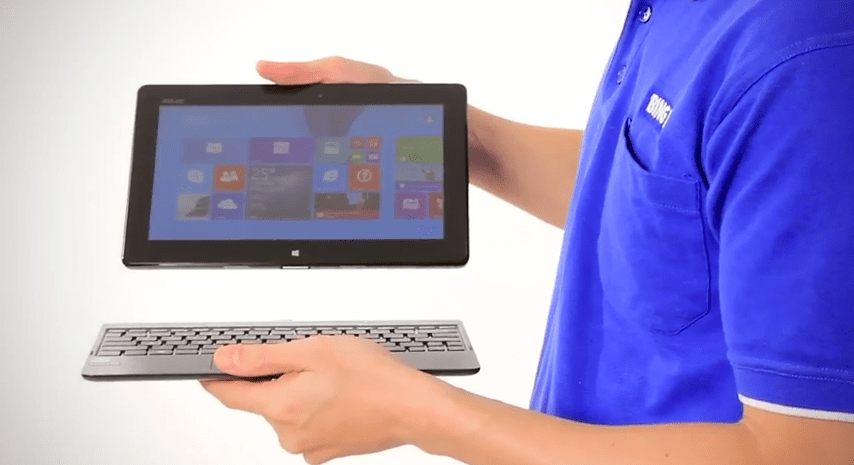
The T100 Transformer Book is the new Windows 8.1 convertible PC from Asus, powered by Intel’s new quad core processor. Let’s unbox and have a close look at this mobile device.

Lets take the lid off and see what we have inside. Now the first thing we see in the box is the tablet portion, wrapped in plastic. Directly below it is the keyboard dock. After we take the dock out, we can see the small documentation slip including a user guide and warranty. Underneath that we can see the power supply and USB cable which connects to the power supply unit and to a PC.

The Transformer Book is a well made device. At five hundred and fifty grams, it’s very portable, is only ten point five millimeters in thickness.

Taking a look around the device we find the volume toggle and a specific Windows button on this side. This takes you back to the start screen in Windows 8.1. On the top there’s just the power button, and on the other side we have a headphone output, micro USB and micro HDMI output. Up a bit further is the Micro SD card slot. On the front we find a 1.2 megapixel camera that can be used with Skype and other video messaging services.

The display is a ten point one inch IPS screen with a thirteen sixty six by seven sixty eight resolution, The two speakers sit on the sides right near the edge of the slate, providing great front firing stereo sound.

Internally, the Transformer Book is powered by a specially designed quad core Atom chip by Intel for mobile devices for quick response for apps and the OS. The new Intel system on a chip is specifically designed to deliver super fast response on mobile devices like this Windows 8.1 tablet, with better graphics and excellent power use.

The new Atom processor is a powerful mobile processor that is the little brother to Intel’s core range seen in larger notebooks. Whether it’s gaming, productivity or entertainment, having Intel Inside means you will have the best mobile experience.

The Transformer Book also features two gigabytes of RAM for superb multitasking, and a sixty four GB flash drive to hold all your documents and files. Of course with the Micro SIM card you can also expand your memory or easily transfer photos and other files to and from the Transformer book.

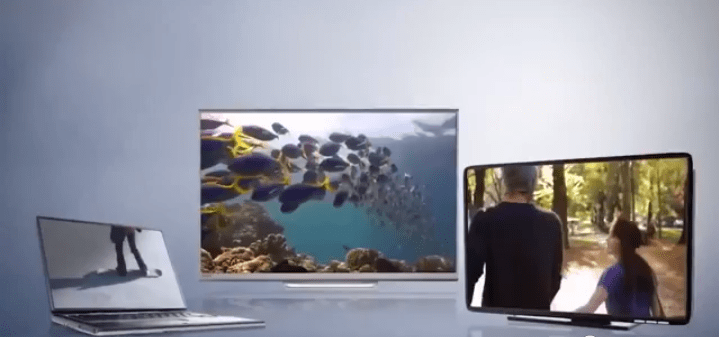
If you want to share your content, it’s a cinch to use a HMDI cable to connect to your flat panel TV to show off your photos and movies. The Micro SD card reader makes it easy to expand your storage and transfer files from other devices like a smartphone or camera.

The Transformer Book provides up to eleven hours of battery life. To extend the functionality and productivity of your Slate, the included keyboard dock provides a notebook-like experience. With the addition of an additional USB three port you can add additional peripherals and storage just like a standard PC. And when you want to take it on the go, it’s easy to undock and take the screen portion by itself.

Lastly, because the Transformer Book uses the full blown version of Windows 8.1, you can install all the third party Windows programs you’re used to using, or discover many more apps on the Windows store. Windows 8.1 allows you to make better use of the screen with improved multi tasking, an official Facebook app, and other in-built features like multi-window mail, improving productivity – and let’s not forget the return of the smart button for better desktop-based control.And for the ultimate in productivity out of the box, the Transformer Book comes with Microsoft Office 2013 Home and Student preloaded.

So if you’re looking for a great value, high performance tablet that provides the best of both worlds in play and work, then the Asus Transformer Book is worth considering.

So come on in to your nearest Bing Lee store, or purchase online right now!

Kris Kringle Ideas

If you work in any kind of office or team environment, chances are you’d be participating in some kind of Secret Santa or Kris Kringle. Believe it or not, this little event can cause a heap of stress to those having to wander the streets, looking for something worthwhile, but not over the top in expense.

Bing Lee have some great low priced but high value electronics items that could be the answer to your Kris Kringle delimnas.

BLE Bluetooth Speaker: If your Kris Kringle uses anything resembling a smartphone, then this would be well appreciated. Stream music from the smartphone using a wireless bluetooth connection, with very easy pairing. Smartphones are great devices but not really suited to sharing music or movies at a decent volume. The BLE speaker delivers great sound, with a rechargeable battery. It even has a built-in microphone, so you can use it as a hands-free call-maker.

Panasonic AM/FM radio: Remember the good old days when families would gather by the fireplace and be regaled with stories of mystery, science fiction and drama, all from a high tech piece of hardware called the WIRELESS? Even though “wireless” now means something very different, you can take your Kris Kringle back to a simpler, more innocent time, where a night’s entertainment would only be a twist of a dial away. But wait, there’s more – you get AM AND FM channels with a 4 inch dynamic speaker. Who said radio was dead?

Kambrook Blitz2GO Personal Blender: Last year the idea of getting a blender for someone’s Secret Santa would have been a little OTT. However, I reckon there’s be a few people secretly hoping for the personal blender from Kambrook that’s taken our stores by storm. It’s called a personal blender because it’s designed to make healthy shakes mixed and blended in the actual bottle that you then take with you on the go. If you have a Kris Kringle that loves making their own healthy snacks, then this could be right up their nutritional alley.

Philips Sports Earhook Headphones: If your Kris Kringle fancies themselves as a bit of a runner or walker, then a pair of sports headphones wouldn’t go astray. These hook over the ears for greater stability while running, jumping or any other physically exertive activities. And the best thing about grabbing one of these now? We’ll throw in another pair free of charge, so you can use a pair yourself or pass as a present to someone else.

Targus Notebook Bundle: Most people own a computer or tablet these days. For those that want to give an IT-flavoured Kris Kringle, a great value bundle here at Bing Lee is the Notebook pack that consists of a bag that can hold up to 16” notebooks, a corded mouse and a 4 port USB hub that doesn’t require any drivers. Your Kris Kringle will be able to be as productive out and about as they are in the office with this affordable notebook pack.

Tablet accessories: For those that have a tablet, there loads of accessories on offer with cases for different models and sizes, screen protectors and adaptors and all at affordable prices. With tablets being used in almost every social, business and entertainment situation today, you need to protect your investment, and covers, cases and extra chargers are sure to be appreciated by a Secret Santa recipient.

That’s just some of the wide range of affordable Kris Kringle ideas available at Bing Lee right now in any of our stores or online.

Season’s greetings from all of us here at Bing Lee!

Xmas Gift Ideas

At Bing Lee, we have a huge range of items that could fit very snugly in a Xmas stocking or wrapping paper, across a wide variety of product groups. Here are some of the products that could tick the box for one (or many) of your friends and family.

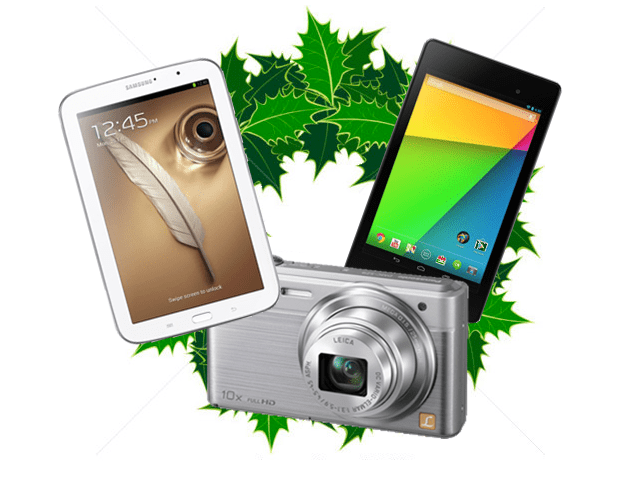
Tablets are the perfectly-sized windows into a world of entertainment, social networking, reading and browsing. Here we’ve chosen two great small sized tablet you can use in bed, on the train or on the couch in the lounge room.

The best features of Google’s tablet platform come together in the Nexus 7, a lightweight, high definition tablet that is perfect for a spot of gaming, browsing the internet, watching TV and movie content or just updating Facebook. So small it can fit in the smallest of handbags, its bright screen is perfect for catching up on a couple of chapters on an ebook or watching a viral YouTube clip.

If you want more functionality out of your tablet then the Samsung Galaxy Note 8 will suit your busy and productive life. It comes with an S-Pen, which allows you to use the tablet as a doodler, photo editor and even recognises your handwriting so you can convert your notes into text that you can then save or send on to others. It also comes with a Micro SD card slot for extra storage capacity.

Taking photos and videos of every moment of your life is now almost second nature. We’ve got a great range of compact, DSLR and high zoom cameras for any budget and shooting need. Here’s a couple of great cameras to fill that empty stocking.

The Panasonic Lumix Compact camera has all the features needed to take great shots and fit in your pocket. With a 25mm wide angle lens you can get all the family (and extended family) into your obligatory group shot, and with built-in wifi connectivity you can instantly share your shots and use your smartphone as a remote viewfinder when you want everyone, including yourself, in the shot!

The toy for the boy who already has a big boy’s toy – a Go Pro action camera that can be mounted* on pretty much anything that moves for dramatic capture of speed, slides, flying, stunts – or even strap it to your dog and throw a stick. Relive everything from your point of view, and because it records in full HD, you can play it back on your big screen TV in lifelike detail. *Wide range of mounting accessories available separately.

With all the cooking programs and books on home cooking all the rage, there’s nothing worse than not having the right equipment to make that perfect dish. Buy your loved one a great new cooking tool and inspire them to be the next world class chef!

The Breville Power Blender has 5 speed settings and can crush ice to make great smoothies, cocktails and juices. The glass jug has a large 1.5L capacity so you can serve the whole family at once. The Power Blender is great for creating healthy shakes to refresh the team after a big game, or unwind with friends and concoct your own “evening” drinks! This blender has versatility for all occasions.

When you’re planning to cook a big winter meal, the first thing you’ll be reaching for is your mixer. The professional stick mixer from Electrolux uses a triple blade for quick and consistent mixing. Adjust the mixing speed and keep track of how fast it’s spinning with the blue LED indicator. The anti-splash design let’s you use the mixer directly in the pot, cutting cleaning and preparation time.

Xmas is a great time to upgrade to a bigger, smarter TV. We are giving away an awesome popcorn making machine with every TV over $1,000. Nothing better than a movie, friends and family and hot buttered popcorn within arm’s length!

When it comes to bigger and smarter, the Samsung UA60ES6500 ticks all the boxes. It’s a huge 60 inches for BIG screen entertainment, with 3D for maximum “in-your-face” action experience and Smart Hub for internet connectivity. It’s full HD for great playback of your Blu Ray collection, and wireless internet so you don’t have to worry about cables or adapters to hook into your network.

If you’re looking for something a little smaller for a bedroom or rumpus room, then the LG 42” television could be a great stocking filler – if your stocking is a metre wide! Now this is a cool TV, with a browser, wireless connectivity, USB recording to a hard drive so you can record programs for the kids or for yourself, and plenty of HDMI inputs for gaming consoles and media players.

With hundreds of other Xmas gift ideas in our stores and online, you’re sure to find something for your friends and family. Here’s a couple of other electronic products that could just be the perfect present for someone close to you!

This high flying quadcopter is controlled by an iOS or Android device. Capture your drone’s flight with the built-in 720p video camera, and control your flight by viewing the drone’s camera through your compatible smartphone or tablet. Learn some great in-air aerobatics and even race or dogfight against another drone. Use one of the many official drone apps to experience the thrill of flying.

This TRIPLE handset from Uniden that comes packed with features that are convenient and focused on safety. Having triple handsets means that no matter where you are in the house, you will be within a few steps of one of the handsets at any time for quick pickups. You can even transfer the call to different handsets so far away family members can have private chats with each of your family members.

Hopefully some of the Xmas ideas above help you solve some of your gift buying dilemmas. Happy shopping!