SAMSUNG 4 Door French Door Fridge

https://www.youtube.com/watch?v=LTaueItHDj0

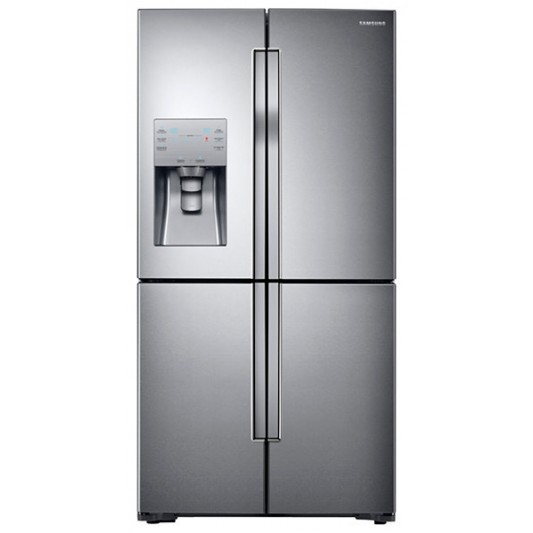
This is the Samsung Chef Mode French Door Fridge with a 719 litre capacity, perfect for big families and frequent entertainers, allowing you to store your groceries and bulkier items with ease.

You can see just by looking from the outside that this is no ordinary fridge. It’s been designed with a stylish and refined look that will add class and sparkle to any kitchen. Small touches like the contoured metal body and recessed handles adds a dash of professionalism to your environment.

On the left here there is Samsung’s ice blue digital display, that lets you control settings at the touch of a button. The Samsung Ice and Water dispenser provides a very tall opening so pitchers and tall decorative glasses can be filled quickly and easily.

Opening the french doors on top, you can see the wide space available, making it easily to see everything at a glance. There’s plenty of space in the fridge and freezer to store any shape or type of food. While we’ve got the doors open, the two step foldable shelf slides in and out and can be folded up to create more room for larger bottles and tall or bulky containers. This way you can adjust it to fit everything in and safely reach to the back of the fridge.

On the side, an easy big door bin lets you safely store larger items like larger larger size cartons of milk or two rows of drink cans, saving space and great for parties.

The high efficiency LED lights illuminate virtually every corner in the fridge, which also saves more space than traditional incandescent bulbs.

The freezer space is split into two doors. the cool select zone plus feature provides the ultimate in food storage flexibility, with the bottom right compartment easily converting from a fridge to a freezer, with 4 temperature settings. For example, the chill mode provides precise cooling for preserving fish, meat and poultry – at -1 degree Celsius, with minimum temperature fluctuation, so they stay fresh with the best flavour and texture.

Samsung’s triple cooling system independently controls and optimises the temperature, maximises humidity and prevents odours mixing in the three compartments. No frost technology means never having to worry about defrosting your fridge again.
Fisher and Paykel Ice and Water French Door Fridge

https://www.youtube.com/watch?v=ZmTVsaUg2zY

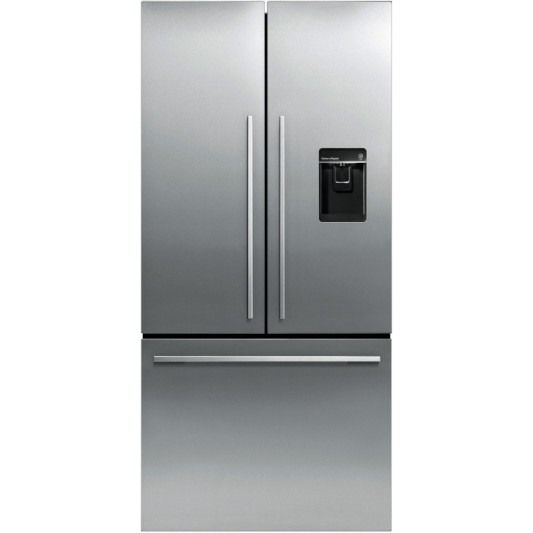
If you’re looking at upgrading your fridge, you may want to look at Fisher and Paykel’s 519 litre Ice & Water French Door . At 790mm wide and 1715mm high, this fridge has been designed to maximise space with unobstructed access to wide open shelf spaces .

High quality EZKleen stainless steel doors add sophistication and will complement any kitchen. The concealed hinges create a seamless finish and soft close doors mean no more slamming fridge doors or having the door left open. The ultra-slim water dispenser is easy to use. The angled water delivery means that almost any size or shape of vessel can be filled, while taking up no storage space in your fridge door.   

Flexible shelving and storage options and easy to access bins and trays on full extension runners allows for smart fridge organisation. The spill proof  shelves are easy to clean and will contain drips and spills.

Activesmart™ Foodcare is the combination of temperature sensors with smart electronics that create a controlled environment and optimum temperature to help keep your food fresher for longer.

The humidity control system, along with the cool and consistent temperature delivered by ActiveSmart™ Foodcare, creates the perfect microclimate in each produce bin . The humidity control slides offer settings for both fruit and vegetables to retain moisture and freshness.

Alarms on the fridge and freezer let you know if the door has been left open, and you can mute when loading the fridge from a large shopping trip . When you’re away, for example on holiday,  this fridge will recognise lower levels of use and defrost less often and therefore use less energy. This is called adaptive defrost.

You can change the temperature of the fridge or freezer easily through the SmartTouch control panel. That’s the Fisher and Paykel 519 litre Ice & Water French Door.  


Fuji Xerox Printer Range

A great range of Fuji Xerox range of printers are available right now at Bing Lee, and they come packed full of easy-to-use features and great print quality throughout the range. Let’s check them out!

All the Fuji Xeerox models printers we’re showing you today have one this in common – the powerful Mopria Print service. By using the Mopria print service, Android mobile device users can easily print to these Fuji Xerox printers. How does this work? First, make sure the printer is connected to the network, either wirelessly or through ethernet depending on what you prefer.

All you then need to do is download the Mopria app from the google play store. Now your android device does need to be running Android 4.4 or later. When you have a photo or document you need to print, just select print from the menu of the app you’re in, and select the printer that you want to print from.

Your handset will automatically discover all the printers you can print to. You can even change some of the print settings, such as media type, duplex or borderless printing. Just tap the print button and your page will be printed by the Fuji Xerox printer you’ve just selected. It’s as easy as that.

That’s Android, and what about Apple devices? This range from Fuji Xerox has you covered there as well. The printers we’re showing today are all Airprint compatible as well, so as long as they are on the same network as your ipad or iPhone, they will be picked up automatically for quick and easy printing. Let’s go through the range now.

The DocuPrint P265DW is a great value single function, mono printer. Its compact design means it can sit on a small desk and it can print up to 30 pages per minute. And at this price with a duplex printing function you’ll be saving paper as well, with the ability to print double sided pages.

The Docuprint CP225W isa full color function printer, bringing to life school projects and business proposals alike. The colours are bright and detailed with up to 1200 by 2400 dpi print resolution. And if you’re in a rush, you can print colour pages up to 18 pages a minute, so you’ll never miss that next meeting.

When you need a productivity workhorse, then look no further than the DocuPrint M265Z 4 in 1 mono printer. This one unit lets you print, copy, scan and fax, giving you great business performance. Duplex printing means efficient use of paper and a better way to present documents to clients. The 2.7 inch colour screen provides a clear and simple interface to access the functions you need at any moment. And how’s this? If you need to copy a business card on both sides, the card copy feature lets you copy both sides and then prints out one page with both sides of the card on the single sheet of paper.

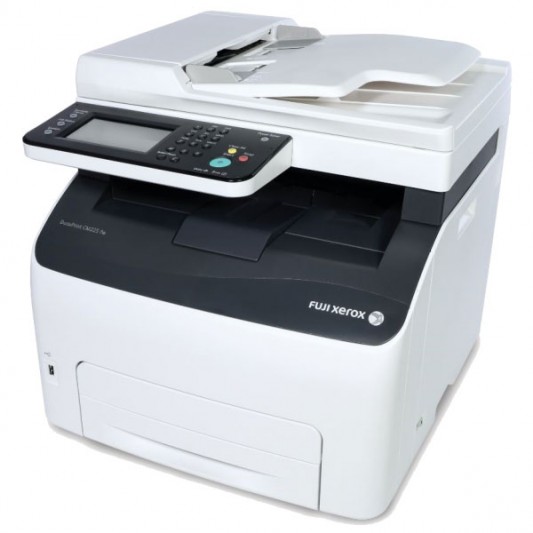
Finally, for the ultimate in both work and home printing, the Docuprint CM225FW is a multifunction colour printer with fax function. You can print, copy and scan documents in full colour, with WPS technology to easily connect to your local wireless network. Like the rest of the range, the image quality from this printer is incredibly detailed, perfect for professional documents and classroom presentations and assignments.

That’s the Fuji Xerox printer range available right now in Bing Lee stores – easy connectivity and printing from mobile devices with great printing image quality.

NETGEAR Nighthawk Range

https://www.youtube.com/watch?v=aYxBQNP6gvo

The average Australian home today is connecting 10 devices. Think about how many devices you have connecting at home?  It quickly adds up, and many of these are streaming videos and gaming at the same time!

It’s important to upgrade your home network and router to suit any application so you can enjoy ultimate performance from all devices, now and in the future. As we demand more from our home network, it is important that we have the correct router to improve the performance for the best online experience

The Netgear range of Nighthawks are perfect for all internet connections and usage types.

There are several routers, modem routers and extenders in the Nighthawk range and each are designed for ultimate performance.

For fast, buffer-free connections your network needs to have as much speed as possible. With next gen AC WiFi, all Nighthawk products feature a minimum of AC1900 dual band WiFi. All nighthawk products include a minimum dual-core 1GHZ processor for faster WiFi, wired and WAN-to-LAN speeds as well as faster USB access.  With best-in-class processors, you can do more, faster.

QoS automatically priorities traffic for best gaming & streaming performance. Beamforming plus boosts speed, reliability & wifi range.These features and more are perfect for all households, with multiple devices, content streaming and gaming.

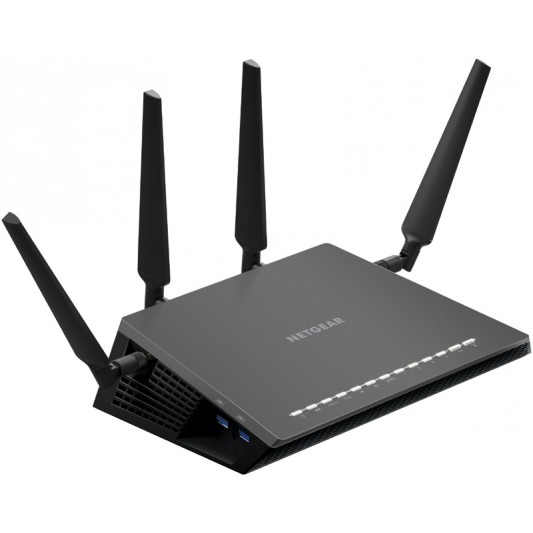
The newest premium model in the Nighthawk range is the D7800 – an AC2600 Dual band Modem router.The outstanding features in this modem router means it is the best performing model in the market.

Traditional WiFi routers stream data to one device at a time. More devices lead to more congestion. MU MIMO enables streaming to multiple devices simultaneously, delivering twice the throughput. As the world’s fastest VDSL/ADSL Modem Router on the market, it will process network traffic incredibly fast, which means not only do you get fast internet but you can run several applications at the same time.

Dynamic QOS will recognize your application and make sure they are performing at their fastest at all times. It also has 2 x USB 3.0 and 1 x Sata port for super-fast data backup and streaming. Additional features like itunes server, secure remote access and enhanced parental controls means security and peace of mind for your network.

And of course, the Netgear Genie app is a great way to monitor and control access across your entire network, a must have app for your Netgear networking services in your household.

Get the best out of your home networking with a new Netgear Nighthawk.

HP Spectre x360 Convertible Notebook

https://www.youtube.com/watch?v=NpgUyJLsRlo

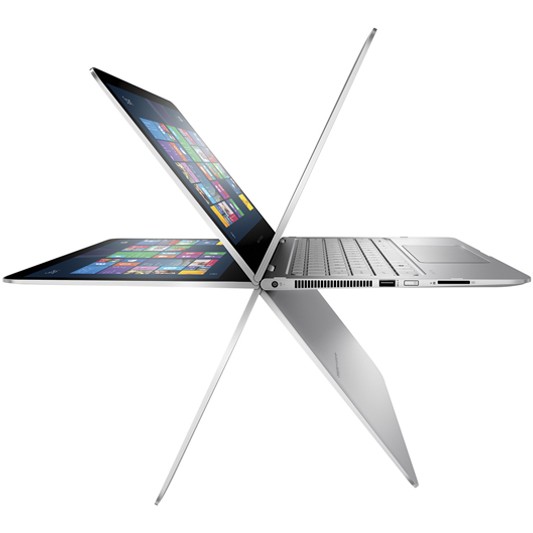
The HP Spectre x360 is a high performance Windows 10 convertible PC from HP, powered by Intel’s latest 6th generation core processor. The Spectre x360 is a smart looking elegantly designed notebook, with its aluminium unibody carefully chiselled by aerospace industry standards. It is as durable as it is refined – a computer that is also a work of art.

Taking a look around the device we find a USB port, power button and SD card slot. On the other side two USB ports, a full size HDMI output, mini display port and volume toggle.. Now it’s worth pointing out that all these are full size connections, which is pretty impressive on such a slim device. On the front we find a TrueVision HD Webcam with an integrated microphone that can be used with Skype and other video messaging services.

The display is a thirteen point three full high definition LED touchscreen with a nineteen twenty by ten eighty resolution. The x360 features Bang and Olufsen with 2 speakers for great audio for movies and music.

Internally, the Spectre x360 is powered by the very latest 6th gen Intel Core i7 processor for amazing response for apps and the OS. This processor delivers a new class of computing with new features to power the next generation of 2 in 1 PCs like this Spectre. Intel’s sixth generation processor gives lightning fast speeds and peak performance through even the toughest of tasks and games.

The x360 also features eight gigabytes of RAM for superb multitasking, and a two hundred and fifty six gigabyte solid state hard drive to hold all your documents and files. Of course with the full size SD card slot card you can also expand your memory or easily transfer photos and other files to and from the Spectre x360. If you want to share your content, it’s a cinch to use a HMDI cable to connect to your flat panel TV to show off your photos and movies.

The Spectre x360 provides up to twelve and a half hours of battery life thanks to the incredibly efficient 6th generation Intel processor. But it’s not just your standard notebook. There are 4 amazing modes the Spectre can transform into depending on your needs. As a notebook it can be your productivity workhorse. In stand mode, it can be angled perfectly for movie watching or video conferencing. In tent mode, it’s great for apps or gaming. And in tablet mode, the screen can be flipped all the way around for easy on-the-go touch screen use.

And with Intel inside, Windows 10 is amazing on the outside. The latest Windows is designed to be used perfectly with Intel processors to enable the best performance out of convertibles just like this HP Spectre x360. From notebook to tablet, Windows 10 runs best on Intel’s new 6th gen intel core processors.

That’s the HP Spectre x360 convertible PC – massive flexibility in notebook, tent, stand and tablet modes – with high end performance and screen to match, all thanks to Intel’s 6th Gen Core processor.

MICROSOFT Office 2016

https://www.youtube.com/watch?v=yotzr6YjXIc

The all new office 2016 for Windows is now available, and here are a few reasons why you should upgrade.

First off, it’s built for team work. Click share in the upper right and you get the new share pane. Before you can share though, you have to save your file to the cloud by clicking this button, then choose the location, and save it. Now, you’re ready to share.

Invite people to the document by typing their names or email addresses. Select whether they can edit or just view. Type a short note, and you’re done. And check this out, real time typing in word. Now you can see other people’s changes as they type them. If you need to know who’s making a change, hover over the flag and you’ll see their name.

Here’s another reason to upgrade – new charts in Word, Excel and Powerpoint. Waterfalls, histograms, creato charts, box and whisker and even charts like tree map and sunburst.

And here’s a faster way to get data into Excel, a feature that is great for both students and businesses. This webpage has some interesting data right here. Previously, you’d need to copy and paste this then spend time formatting it. But, with Excel 2016, it’s much easier. First, copy the url of the page. Now, in Excel, go to the data tab, new query, from other sources, and we choose from web.

I’ll paste in the url and click okay. Now Excel gives me a list of tables on that webpage. 10 most populous countries is the one I want. Click that option, and then click edit. Excel brings in the data, but because data from the web isn’t always perfect, I can do some special clean up here. You can remove extra columns, make the first rows into headers and format this column as numbers. When you’re done, just click close and load. Now the data is in excel and you can work with it and analyse it however you want to. And the cool things is, I can click refresh and see any changes that may have been made on the webpage.

Here’s yet another great reason to upgrade to 2016. Attachments are even easier in Outlook. You no longer have to hunt for files on your computer. Click the paper clip button, and you’ll see recent files you’ve been working on. Click one, and it gets attached to the email. If you attach a file that’s on OneDrive, Outlook will create a special cloud attachment, which is essentially a link to the file. So when people double click it, they’ll go to the original file on the cloud, not a copy of the file.

Another new feature is smart lookup. If you need to quickly research something while working in a document, select a word, like snowboarding, then right click and click smart lookup, and you’ll get search results from the web.

Finally, there is Tell Me. Say you have  hard time remembering where a button or menu is. Just click inside the Tell Me box, type a word or two, and the button appears right away for you to use.  

That’s the Office 2016 for Windows. Built for teams and working smarter.

SAMSUNG Galaxy Tab S2 Range

https://www.youtube.com/watch?v=smlN3_tDuuk

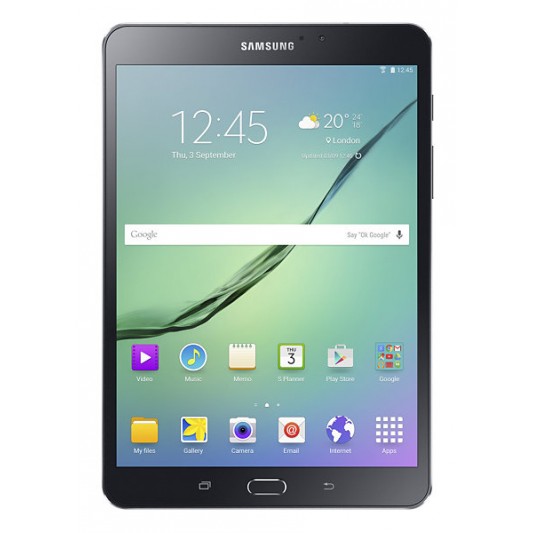
The brand new GALAXY Tab S 2 range has now been released and available at Bing Lee, and we’re here to show you what it’s all about. The Tab S 2 comes in two models – an 8 inch and 9.7 inch model. Both models are designed for portability, with a slim profile and lightweight body. The durable metal frame and stylish polished finish will turn heads.

The 8 inch model fits comfortably in one hand for ebook reading, casual video watching, social media updating and browsing. The 9.7 inch model is great for big screen movie enjoyment, with a larger display for immersive gaming and entertainment as well as productivity sessions. Both models are the thinnest and lightest Galaxy Tablets yet and come in distinctive white and black bodies.

It’s fair to say the most important aspect of a tablet is its display, and the Samsung Tab S 2 does not disappoint, in fact it bowls you over with its Super AMOLED display. Videos and movies are delivered with incredible detail and colour. The 4 by 3 ratio fills your display with content, whether you’re web browsing or writing an email, with natural book-like proportions.

The resolution is astounding, with a 2048 by 1536 resolution, making text and images crystal clear and easy on the eye. And it doesn’t matter what environment you’re in, the screen adjusts to ensure you’re getting the optimum viewing whatever the lighting conditions are when you’re using selected Samsung apps such as gallery, video player and browser.

The Tab S 2 range has a fingerprint scanner built in for extra security and even payments, maximising the security for the data on your device and the financial transactions you want to make while online. You can even create different profiles with multi-user mode so that only the data for that user is accessible, and they don’t need to remember a password, just touch their finger on the home button.

Multi-window optimises your productivity and entertainment when you need to be doing two things at once. For example, have your browser open while you type an email, or watch a video while you read up on the show’s latest updates. For work and play, multiwindow streamlines your activities. Speaking of productivity, the new Tab S 2 range comes has Microsoft Office built in with Microsoft Word, Excel, Powerpoint and OneNote out of the box, along with 100GB of free OneDrive storage so you can keep business going wherever you are.

With AC wireless capability, you can stream high quality video and music to be entertained on the go.  There’s also ultra power saving mode that turns your screen to black and shuts off non essential apps so you can still use your Tab S 2 when the battery is low.

Both models also have an eight megapixel camera and takes great low light photos, along with a 2.1 megapixel front camera for selfies and video chats. There are preinstalled modes and filters to get creative with your shots.

That’s the new Tab S 2 range – stylish, visually impressive and perfect for productivity and entertainment on the go.

SAMSUNG Galaxy S6 Edge Plus

https://www.youtube.com/watch?v=DqNbXXegY1c

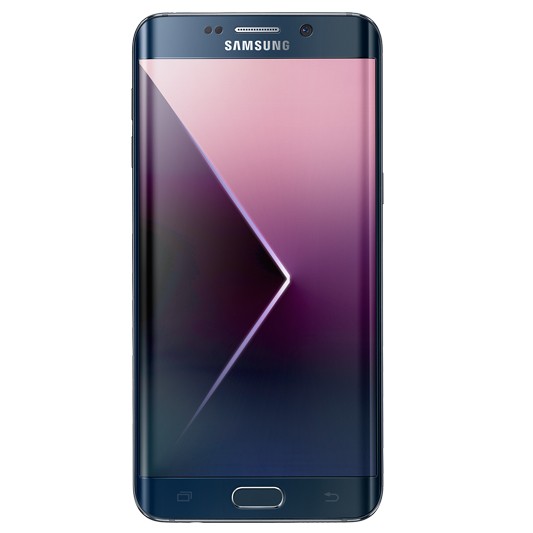
Today we’re showing you Samsung’s large screen addition to the S6 family, the Galaxy S6 Edge Plus, which seamlessly blends premium materials with the most powerful Samsung technology yet.

Carefully crafted from metal and glass, the Galaxy S6 edge plus blends a premium and stylish design with powerful features. The Galaxy S6 edge delivers a vivid and immersive viewing experience with a 5.7 inch curved display on both sides. Its glass body is made from the toughest glass to date, Gorilla Glass 4.

The Galaxy S6 edge plus is matched with a totally revamped and lighter interface that makes it easier to use. The Touchwiz with Lollipop operating system simplifies applications and offers features and settings in a more intuitive way.  Swiping the edge of the S6 edge plus gives you access to commonly used apps and your favourite contacts. You can customise this edge feature to appear on either curved side as well as the position of your apps and contacts.

For those that love taking pics, the Galaxy S6 edge plus is equipped with a powerful, bright and fast front and rear camera. The F1.9 lenses and high resolution sensors on both the five megapixel front and sixteen megapixel rear cameras provide brilliant images in a smartphone, even in low light. In addition, Auto Real-time High Dynamic Range and Smart Optical Image Stabilization provide more natural white balance and colour tones as well as sharp images.

The Pro mode gives you even more control over your photos and you can save your favourite images in RAW format just like a professional camera. A “Quick Launch” feature give users fast, direct access to the camera from any screen in just 0.7 seconds* by simply double clicking the home key button. These advanced camera functions help users to capture their most precious and personal moments in both spontaneous and planned situations.

The Galaxy S6 edge plus also works with any wireless pad available in the market that supports the common WPC and PMA standards. Using the new Ultra fast wireless charging pad, you can go from flat to a full battery in just two hours.  They have incredibly fast wired charging, providing about 4 hours of usage after only 10 minutes of charging.

The 5.7-inch Quad HD Super AMOLED screen offers users a screen with pixels virtually indiscernible to the naked eye. Enhanced outdoor visibility with a brighter display lets consumers experience content without compromise, be it videos, images or text, anywhere, at any time.

That’s the new Samsung Galaxy S6 Edge Plus – powerful, head turning and personal.

SAMSUNG Galaxy Note 5 Highlights

https://www.youtube.com/watch?v=hzc5ggxt78U

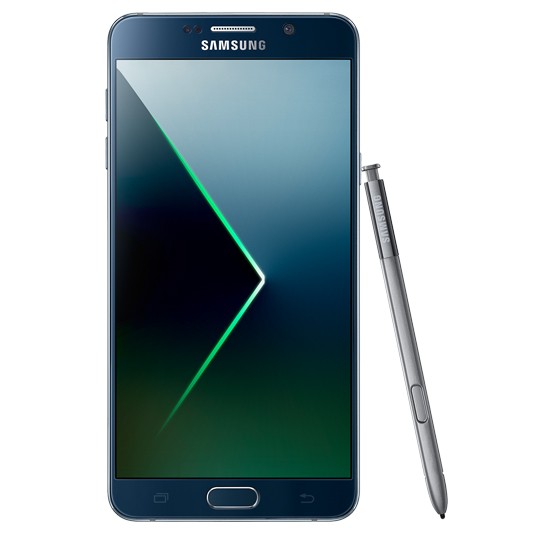
Today we’re showing you Samsung’s new productivity powerhouse, the Galaxy Note 5, which seamlessly blends premium materials with the most powerful and useful Samsung technology yet.

Carefully crafted from metal and glass, the Galaxy Note 5 plus blends a premium and stylish design with powerful features. The Galaxy Note 5 delivers a vivid and immersive viewing experience with a 5.7 inch AMOLED display with practically no borders. Its glass body is made from the toughest glass to date, Gorilla Glass 4. The curved back of the Note 5 makes it very easy to hold in just one hand.

The Galaxy Note 5 is a powerful productivity tool. Use the S pen with air command to draw, write, and edit images with ease. The multi-window feature allows you to have two apps on the screen at once, so you can drag and drop text from a website to an email for example. The 4GB of RAM keeps all active apps running at their optimum, making switching between your apps smooth and lightning fast.

The addition of pre-loaded Microsoft apps and 130GB of Microsoft OneDrive storage space gives you all the business tools you need right out of the box. The Octa-core processor will never make you wait to get the work done.

For those that love taking pics, the Galaxy Note 5 plus is equipped with a powerful, bright and fast front and rear camera. The F1.9 lenses and high resolution sensors on both the five megapixel front and sixteen megapixel rear cameras provide brilliant images in a smartphone, even in low light. In addition, Auto Real-time High Dynamic Range and Smart Optical Image Stabilization provide more natural white balance and colour tones as well as sharp images.

The Pro mode gives you even more control over your photos and you can save your favourite images in RAW format just like a professional camera. A “Quick Launch” feature give users fast, direct access to the camera from any screen in just 0.7 seconds* by simply double clicking the home key button. These advanced camera functions help users to capture their most precious and personal moments in both spontaneous and planned situations.

The Galaxy Note 5 also works with any wireless pad available in the market that supports the common WPC and PMA standards. Using the new Ultra fast wireless charging pad, you can go from flat to a full battery in just two hours. They have incredibly fast wired charging, providing about 4 hours of usage after only 10 minutes of charging.

The 5.7-inch Quad HD Super AMOLED screen offers users a screen with pixels virtually indiscernible to the naked eye. Enhanced outdoor visibility with a brighter display lets you get on with business without compromise, be it videos, images or text, anywhere, at any time.

That’s the new Samsung Galaxy Note 5 – powerful, productive and personal.

BELKIN WeMo Connected Home Range at Bing Lee

https://www.youtube.com/watch?v=6uqGpcCm_rk

With the release of Belkin’s Home automation is now within reach of anyone with a smartphone and wireless network. With this new range of smart connected products, you can be in control of lighting, turn appliances on and off from your powerpoint and keep an eye on your home when you’re not around.

Belkin’s Wemo range is really simple to setup and use. This is because the entire range is modular, meaning you can start with just one or a couple of Wemo devices, and then add on as you require. Everything seamlessly links back to your wireless router, with most components connecting back to your router directly.

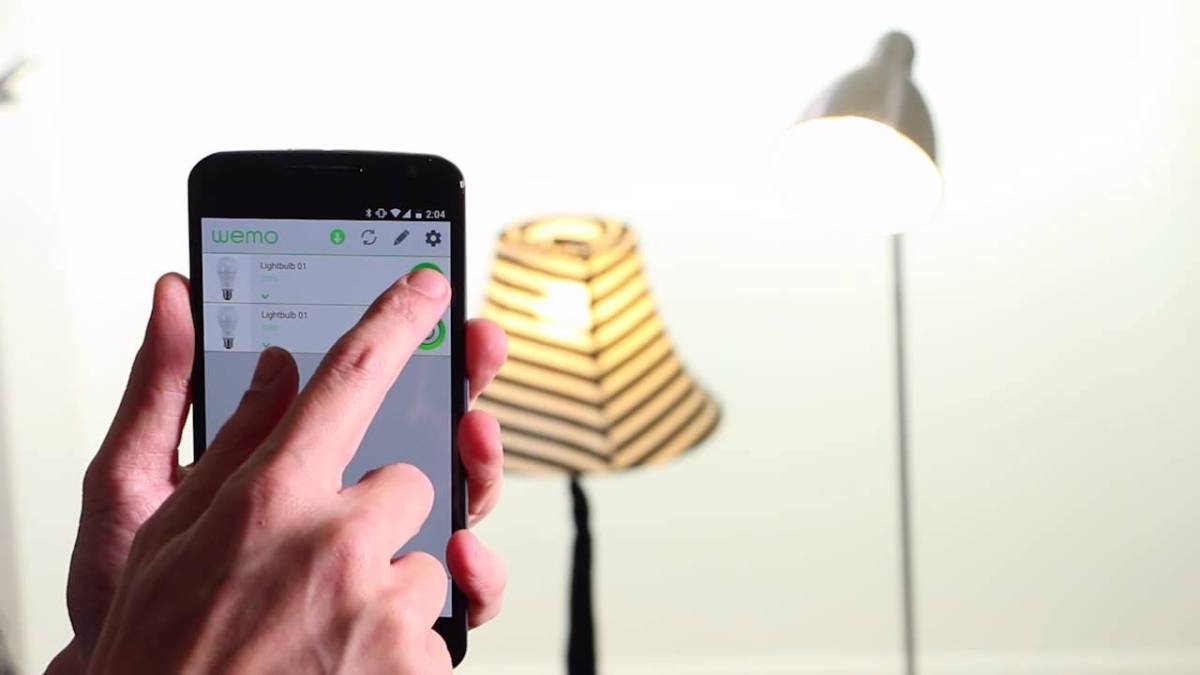
Everything is controlled by a free app that you can download and use on your Android Smartphone or iPhone. In fact, you don’t need a computer to get your Wemo devices connected at all – just use the Wemo app to identify and connect your Wemo device to the network. After that, you can monitor and control your WeMo products from inside your house or halfway around the world.

Here’s some of the WeMo components that are now available. The WeMo LED lighting starter set is a great way to get started with your smart home control. This pack comes with two smart light LEDs in your choice of either bayonet or screw-in. The starter pack comes with the WEMO link, which is the central control unit for the WeMo light bulbs. The beauty of this WeMo link system is that you can connect up to 50 WeMo light bulbs and control each one of them.

Using the Wemo link, the light bulbs and the WeMo app, you can turn your lights on and off, dim them for different mood lighting, and schedule them to automatically switch on or off. Group your light bulbs into locations or rooms and control them individually or together.

The WeMo switch lets you turn appliances on and off from an external location. For example, if the weather suddenly turns chilly while you’re out, you can turn on your electric heater remotely. Like the light bulbs, you can also put appliances connected to the WeMo switch onto a power schedule.

The Wemo Insight switch adds energy consumption tracking as well. You can track the usage of any appliance plugged into the Insight switch, and you can export that data to look closer at energy use and cost, a great tool to minimising your power bill.

The Belkin Netcam HD is a great security addition to your house, which also connects directly to your router and delivers high definition images to your smartphone via the Belkin Netcam app. It’s not just streaming live video from your cameras, you can also record the vision and sound from the room that’s being covered by the Netcam. The NetCam HD also comes with infrared night vision, for perfect monitoring any time of day.

Home Automation is simpler than ever with Belkin’s WeMo range of smart home devices.