SAMSUNG Galaxy Tab S2 Range

https://www.youtube.com/watch?v=smlN3_tDuuk

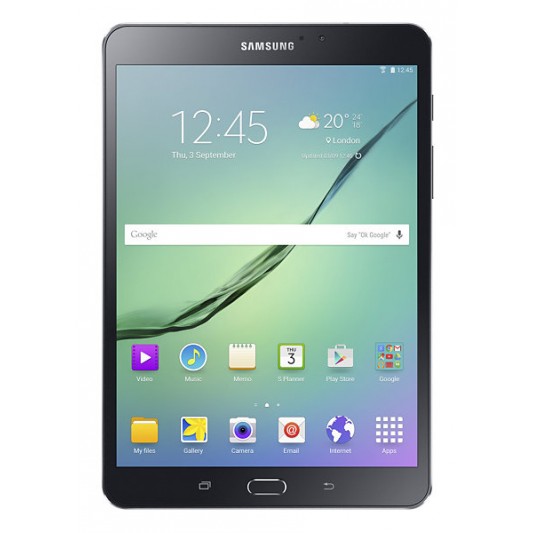
The brand new GALAXY Tab S 2 range has now been released and available at Bing Lee, and we’re here to show you what it’s all about. The Tab S 2 comes in two models – an 8 inch and 9.7 inch model. Both models are designed for portability, with a slim profile and lightweight body. The durable metal frame and stylish polished finish will turn heads.

The 8 inch model fits comfortably in one hand for ebook reading, casual video watching, social media updating and browsing. The 9.7 inch model is great for big screen movie enjoyment, with a larger display for immersive gaming and entertainment as well as productivity sessions. Both models are the thinnest and lightest Galaxy Tablets yet and come in distinctive white and black bodies.

It’s fair to say the most important aspect of a tablet is its display, and the Samsung Tab S 2 does not disappoint, in fact it bowls you over with its Super AMOLED display. Videos and movies are delivered with incredible detail and colour. The 4 by 3 ratio fills your display with content, whether you’re web browsing or writing an email, with natural book-like proportions.

The resolution is astounding, with a 2048 by 1536 resolution, making text and images crystal clear and easy on the eye. And it doesn’t matter what environment you’re in, the screen adjusts to ensure you’re getting the optimum viewing whatever the lighting conditions are when you’re using selected Samsung apps such as gallery, video player and browser.

The Tab S 2 range has a fingerprint scanner built in for extra security and even payments, maximising the security for the data on your device and the financial transactions you want to make while online. You can even create different profiles with multi-user mode so that only the data for that user is accessible, and they don’t need to remember a password, just touch their finger on the home button.

Multi-window optimises your productivity and entertainment when you need to be doing two things at once. For example, have your browser open while you type an email, or watch a video while you read up on the show’s latest updates. For work and play, multiwindow streamlines your activities. Speaking of productivity, the new Tab S 2 range comes has Microsoft Office built in with Microsoft Word, Excel, Powerpoint and OneNote out of the box, along with 100GB of free OneDrive storage so you can keep business going wherever you are.

With AC wireless capability, you can stream high quality video and music to be entertained on the go.  There’s also ultra power saving mode that turns your screen to black and shuts off non essential apps so you can still use your Tab S 2 when the battery is low.

Both models also have an eight megapixel camera and takes great low light photos, along with a 2.1 megapixel front camera for selfies and video chats. There are preinstalled modes and filters to get creative with your shots.

That’s the new Tab S 2 range – stylish, visually impressive and perfect for productivity and entertainment on the go.
SAMSUNG Galaxy S6 Edge Plus

https://www.youtube.com/watch?v=DqNbXXegY1c

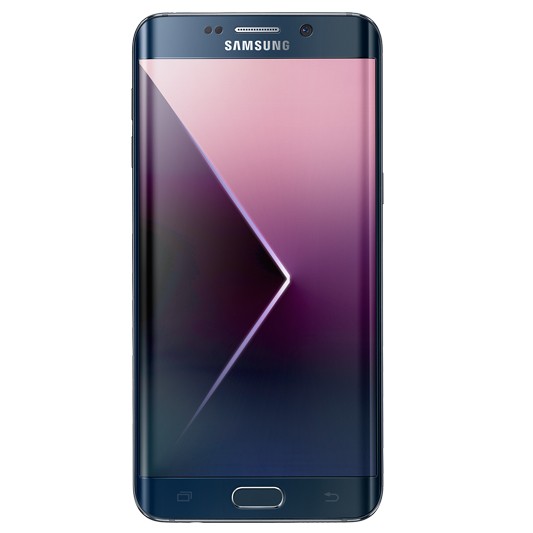
Today we’re showing you Samsung’s large screen addition to the S6 family, the Galaxy S6 Edge Plus, which seamlessly blends premium materials with the most powerful Samsung technology yet.

Carefully crafted from metal and glass, the Galaxy S6 edge plus blends a premium and stylish design with powerful features. The Galaxy S6 edge delivers a vivid and immersive viewing experience with a 5.7 inch curved display on both sides. Its glass body is made from the toughest glass to date, Gorilla Glass 4.

The Galaxy S6 edge plus is matched with a totally revamped and lighter interface that makes it easier to use. The Touchwiz with Lollipop operating system simplifies applications and offers features and settings in a more intuitive way.  Swiping the edge of the S6 edge plus gives you access to commonly used apps and your favourite contacts. You can customise this edge feature to appear on either curved side as well as the position of your apps and contacts.

For those that love taking pics, the Galaxy S6 edge plus is equipped with a powerful, bright and fast front and rear camera. The F1.9 lenses and high resolution sensors on both the five megapixel front and sixteen megapixel rear cameras provide brilliant images in a smartphone, even in low light. In addition, Auto Real-time High Dynamic Range and Smart Optical Image Stabilization provide more natural white balance and colour tones as well as sharp images.

The Pro mode gives you even more control over your photos and you can save your favourite images in RAW format just like a professional camera. A “Quick Launch” feature give users fast, direct access to the camera from any screen in just 0.7 seconds* by simply double clicking the home key button. These advanced camera functions help users to capture their most precious and personal moments in both spontaneous and planned situations.

The Galaxy S6 edge plus also works with any wireless pad available in the market that supports the common WPC and PMA standards. Using the new Ultra fast wireless charging pad, you can go from flat to a full battery in just two hours.  They have incredibly fast wired charging, providing about 4 hours of usage after only 10 minutes of charging.

The 5.7-inch Quad HD Super AMOLED screen offers users a screen with pixels virtually indiscernible to the naked eye. Enhanced outdoor visibility with a brighter display lets consumers experience content without compromise, be it videos, images or text, anywhere, at any time.

That’s the new Samsung Galaxy S6 Edge Plus – powerful, head turning and personal.

SAMSUNG Galaxy Note 5 Highlights

https://www.youtube.com/watch?v=hzc5ggxt78U

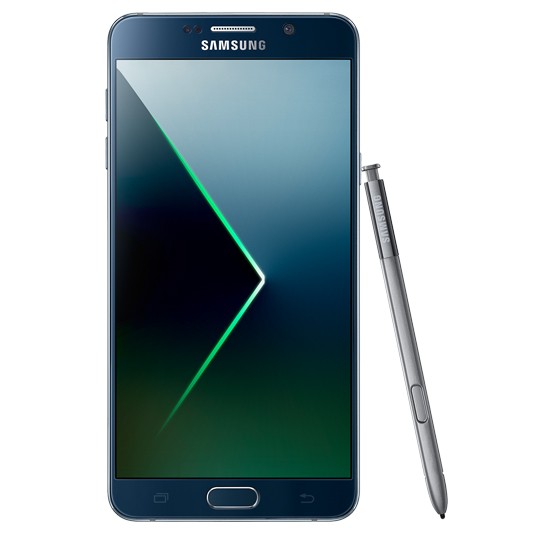
Today we’re showing you Samsung’s new productivity powerhouse, the Galaxy Note 5, which seamlessly blends premium materials with the most powerful and useful Samsung technology yet.

Carefully crafted from metal and glass, the Galaxy Note 5 plus blends a premium and stylish design with powerful features. The Galaxy Note 5 delivers a vivid and immersive viewing experience with a 5.7 inch AMOLED display with practically no borders. Its glass body is made from the toughest glass to date, Gorilla Glass 4. The curved back of the Note 5 makes it very easy to hold in just one hand.

The Galaxy Note 5 is a powerful productivity tool. Use the S pen with air command to draw, write, and edit images with ease. The multi-window feature allows you to have two apps on the screen at once, so you can drag and drop text from a website to an email for example. The 4GB of RAM keeps all active apps running at their optimum, making switching between your apps smooth and lightning fast.

The addition of pre-loaded Microsoft apps and 130GB of Microsoft OneDrive storage space gives you all the business tools you need right out of the box. The Octa-core processor will never make you wait to get the work done.

For those that love taking pics, the Galaxy Note 5 plus is equipped with a powerful, bright and fast front and rear camera. The F1.9 lenses and high resolution sensors on both the five megapixel front and sixteen megapixel rear cameras provide brilliant images in a smartphone, even in low light. In addition, Auto Real-time High Dynamic Range and Smart Optical Image Stabilization provide more natural white balance and colour tones as well as sharp images.

The Pro mode gives you even more control over your photos and you can save your favourite images in RAW format just like a professional camera. A “Quick Launch” feature give users fast, direct access to the camera from any screen in just 0.7 seconds* by simply double clicking the home key button. These advanced camera functions help users to capture their most precious and personal moments in both spontaneous and planned situations.

The Galaxy Note 5 also works with any wireless pad available in the market that supports the common WPC and PMA standards. Using the new Ultra fast wireless charging pad, you can go from flat to a full battery in just two hours. They have incredibly fast wired charging, providing about 4 hours of usage after only 10 minutes of charging.

The 5.7-inch Quad HD Super AMOLED screen offers users a screen with pixels virtually indiscernible to the naked eye. Enhanced outdoor visibility with a brighter display lets you get on with business without compromise, be it videos, images or text, anywhere, at any time.

That’s the new Samsung Galaxy Note 5 – powerful, productive and personal.

BELKIN WeMo Connected Home Range at Bing Lee

https://www.youtube.com/watch?v=6uqGpcCm_rk

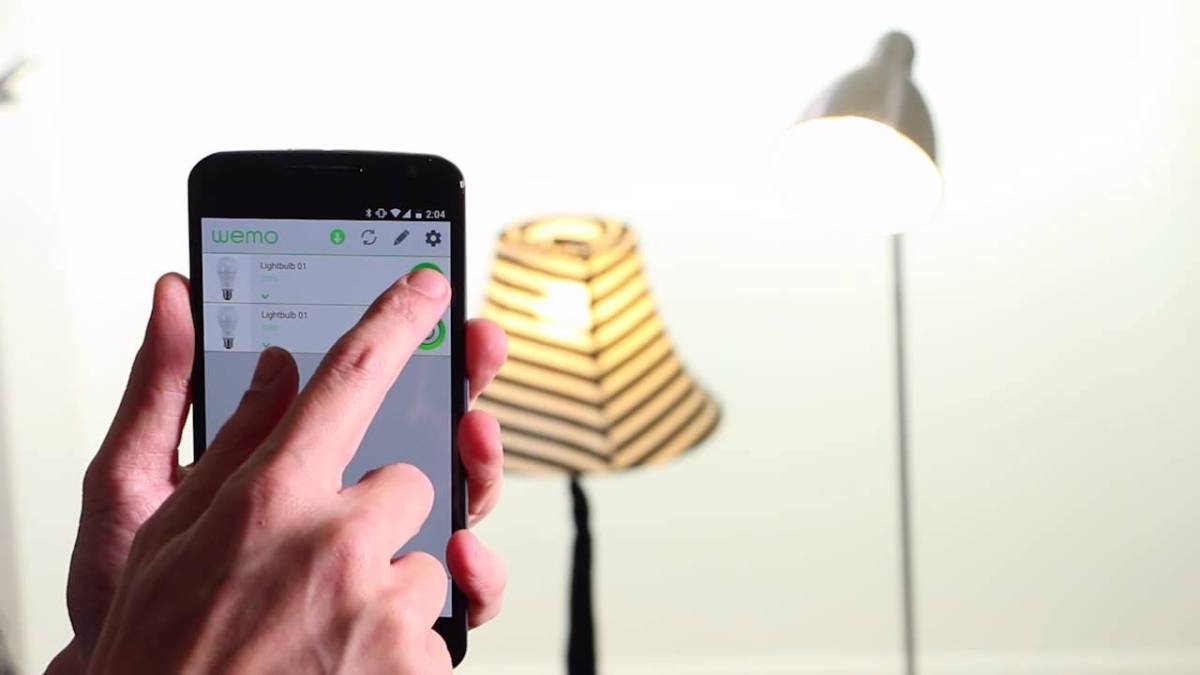
With the release of Belkin’s Home automation is now within reach of anyone with a smartphone and wireless network. With this new range of smart connected products, you can be in control of lighting, turn appliances on and off from your powerpoint and keep an eye on your home when you’re not around.

Belkin’s Wemo range is really simple to setup and use. This is because the entire range is modular, meaning you can start with just one or a couple of Wemo devices, and then add on as you require. Everything seamlessly links back to your wireless router, with most components connecting back to your router directly.

Everything is controlled by a free app that you can download and use on your Android Smartphone or iPhone. In fact, you don’t need a computer to get your Wemo devices connected at all – just use the Wemo app to identify and connect your Wemo device to the network. After that, you can monitor and control your WeMo products from inside your house or halfway around the world.

Here’s some of the WeMo components that are now available. The WeMo LED lighting starter set is a great way to get started with your smart home control. This pack comes with two smart light LEDs in your choice of either bayonet or screw-in. The starter pack comes with the WEMO link, which is the central control unit for the WeMo light bulbs. The beauty of this WeMo link system is that you can connect up to 50 WeMo light bulbs and control each one of them.

Using the Wemo link, the light bulbs and the WeMo app, you can turn your lights on and off, dim them for different mood lighting, and schedule them to automatically switch on or off. Group your light bulbs into locations or rooms and control them individually or together.

The WeMo switch lets you turn appliances on and off from an external location. For example, if the weather suddenly turns chilly while you’re out, you can turn on your electric heater remotely. Like the light bulbs, you can also put appliances connected to the WeMo switch onto a power schedule.

The Wemo Insight switch adds energy consumption tracking as well. You can track the usage of any appliance plugged into the Insight switch, and you can export that data to look closer at energy use and cost, a great tool to minimising your power bill.

The Belkin Netcam HD is a great security addition to your house, which also connects directly to your router and delivers high definition images to your smartphone via the Belkin Netcam app. It’s not just streaming live video from your cameras, you can also record the vision and sound from the room that’s being covered by the Netcam. The NetCam HD also comes with infrared night vision, for perfect monitoring any time of day.

Home Automation is simpler than ever with Belkin’s WeMo range of smart home devices.

New SAMSUNG Xpress NFC Printer Range

https://www.youtube.com/watch?v=PK0gXh6xSCw

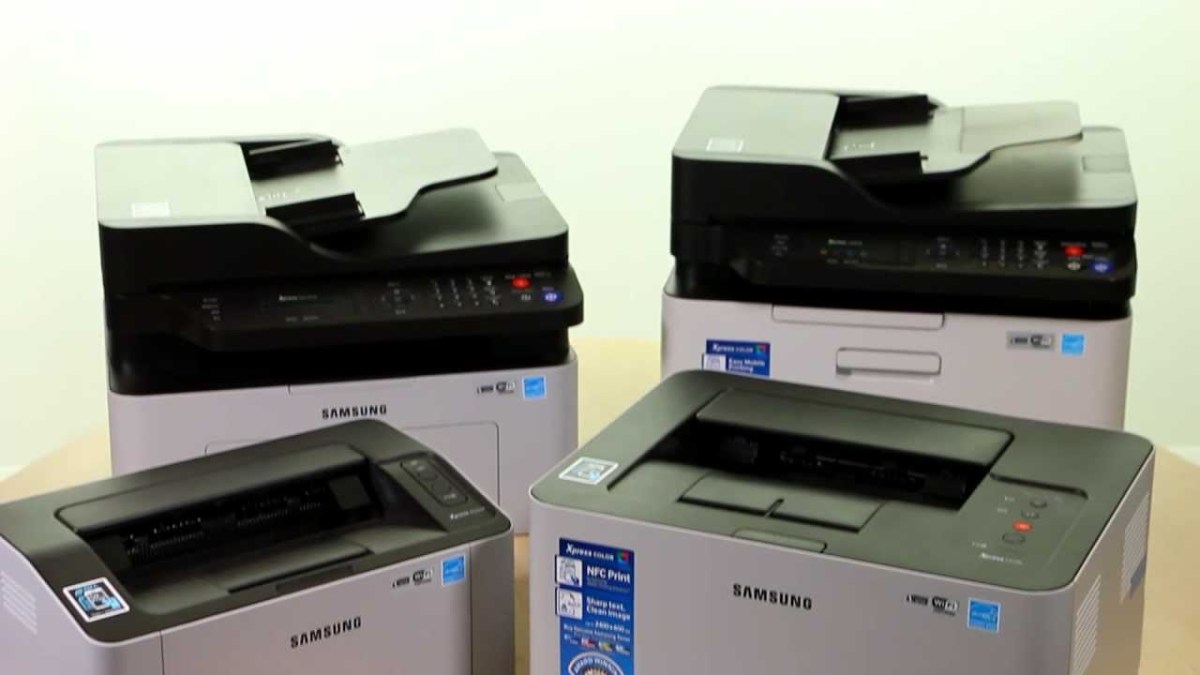
Samsung’s new range of printers is now in store, and they come with some great new features that make it even easier to print when and wherever you need to.

All of the models here also support Google Cloud Print, making it super easy to print if you’re a user of google services. If you have a notebook, Chromebook or Android tablet and you want to print a document, just register the printer with the Google Cloud Print service and you can print directly off the Chrome browser or from the CloudPrint app that is available from the Google Play store.

Samsung’s own Cloudprint service is also available to pair your mobile device with your printer allowing you to print from anywhere. Send print jobs to the office from the taxi or even print photos at the grandparents to share holiday moments.

Samsung has also incorporated NFC into their new printer line up to make it even easier to connect wirelessly to your printer. So let’s see how it works.

First, download the Samsung Mobile Print app from the Google play store. Next activate the mobile printing app by simply tapping the phone on the printer to make the connection. Seriously, that’s all.

Next, all you need to do is select the content you want to print from within the MobilePrint app – this can include photos, documents, even web pages. Tap the printer on this location here to print and you’re done. You can also use the mobileprint app to scan, copy and fax as well, so you can have full control on your wireless device.

So let’s look at the lineup of Samsung NFC printers at Bing Lee. The SL-M2020W is a top value mono laser printer that has a very small footprint and up to 20 page per minute print performance.

The step up from that is the SL-M2070FW, a mono laser multifunction with the same print speed and the versatility of printing, copying, scanning and faxing. Wifi is super easy to set up with WPS mode for easy wireless network connection.

Then we have the colour models, with the Xpress C430W, a single function printer that prints 18 pages per minute in mono and 4 pages per minute in full colour, with a yield up to 1,500 pages with the full replacement toner.

Lastly but not least, the SL-C480FW is a colour printer, copier, scanner and fax with 18 pages per minute mono output and 4 pages per minute colour document printing. The auto document feeder makes large batches of document printing are efficiently processed the WPS set up makes it a cinch to enable wireless printing for the entire household.

That’s the brand new Samsung laser printer range, with GooglePrint and NFC printing built in, so you can print straight from your NFC enabled smartphone or tablet or google connected service. Work smarter, easier and faster.

Samsung Curved Monitors at Bing Lee

https://www.youtube.com/watch?v=72JpOyw9wYQ

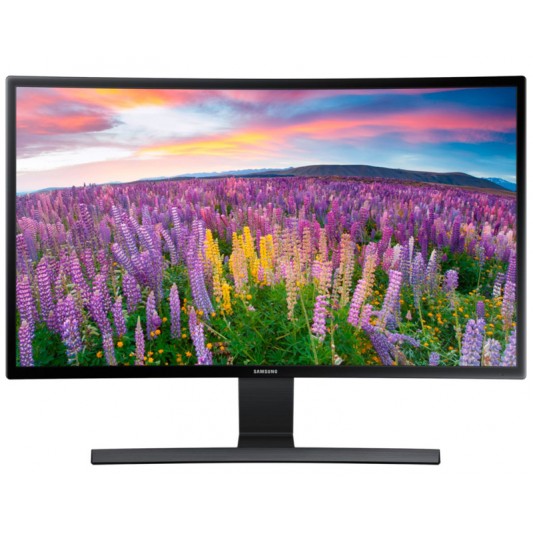
If you’re looking for a new monitor for your workstation, here’s an idea. Samsung’s curved TVs are in stores and in lots of people’s homes now, but what about the home office? Meet the Samsung curved monitor, available in both twenty three and twenty seven inch sizes.

The full high definition curved screen provides optimal comfort for viewing, delivering a wider field of vision that’s easier on the eyes. The glossy black body is framed by a narrow bezel and elevated by a t-shaped stand. It can be tilted backwards and forwards to optimise your viewing comfort. It includes a VESA support to easily mount onto a wall with a VESA bracket.

The three thousand to one contrast ratio delivers more vivid images than a conventional monitor. The brilliant images pop with deep blacks, pristine whites and bright colours, with less light leakage. This means you get all the benefits of a great day time office monitor along with the perfect personal video entertainment display after hours.

For the best after hours experience, this curved monitor has a game mode that adjusts the display settings to improve the darkness of the picture so you can see all the action vividly. The fast four millisecond response time reduces motion blur, judder and ghosting, leaving you with an incredible image that you’ll love watching.

And if you’re a power user of your monitor you’ll appreciate these features. Eye saver mode reduces blue light emissions that have a higher fatigue rate on the eyes, and flicker free technology reduces screen flickering for a improved viewing experience.

And if you want to share your screen, the 178 degree viewing angle can be seen from any angle, vertical or horizontal, making effective and impactful presentations possible with this curved screen.

NESPRESSO Lattissima Touch at Bing Lee

https://www.youtube.com/watch?v=nDD35rYFkAo

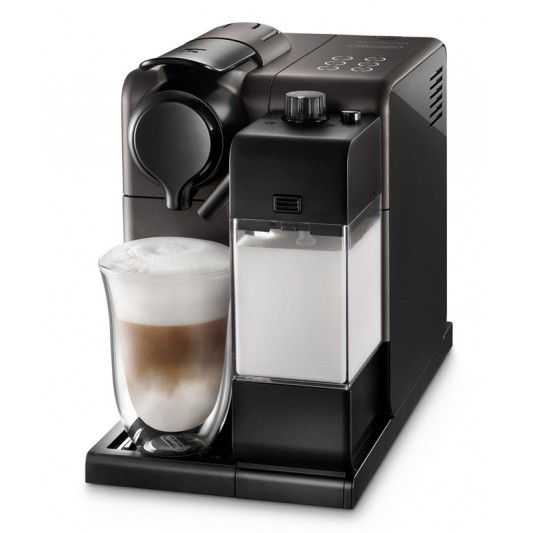
We’re here to show you the latest Nespresso machine, the Lattissima Touch, with a stylish sleek design in Titanium black, the perfect addition to any modern kitchen. The Lattissima Touch features the patented automatic cappuccino system, personalised beverage preparation with six one touch recipes, to deliver the perfect cup of coffee every single time.

As Australians we love our milk-based coffee, and Lattissima Touch delivers a perfect blend of milk and coffee every time, no matter what your coffee style is.

To get a perfect milk froth each time, all you have to do is this. Press the power button, and the machine heats up in just 25 seconds. To prepare warm milk froth, cappuccino or a latte macchiatto, fill the milk container with the desired quantity of milk, preferably fresh cold milk just out of the fridge.

Open the steam connector door and put the rapid cappuccino system in place. This will take only 15 seconds to heat. You can place a short cup under the coffee outlet, but you can also push the drip tray into the machine if you’re using a tall glass for a latte for example. Adjust the spout to suit the cup height.

You can adjust the texture of milk froth by turning this knob left or right. Use minimum froth texture for cappuccinos and maximum froth texture for latte macchiatos. Insert a capsule here. Then press the cappuccino or macchiato button to begin. The preparation will start and stop automatically. After your coffee is prepared, the clean indicator will shine orange, and you should make it a habit of cleaning your milk container after each beverage preparation.

It’s super easy to personalise your coffee volume on the Lattissima touch. As you can see there are 6 beverage functions. Ristretto, espresso, lungo, latte macchiato, cappuccino and warm milk froth. These preparations start automatically when you have reached a specific volume. You can tailor the volume of these drinks to better suit your preferences.

To begin, press and hold the desired coffee selection for 3 seconds. This enters a programming mode, and the button will blink rapidly and the brewing will start. Keep the button pressed for the entire process as the coffee flows. Then, release the button when the desired volume is reached. That button will blink three times to confirm the new volume has been stored. From then on that selection will flow to the programmed volume. For milk and coffee blends, you simply repeat the process for the milk flow and the coffee flow.

With the new Lattissima Touch from Nespresso, it only takes your touch to experience a great coffee every single time, exactly how you like it.

Fitbit Product Range at Bing Lee

https://www.youtube.com/watch?v=W3RiQB-FxG0

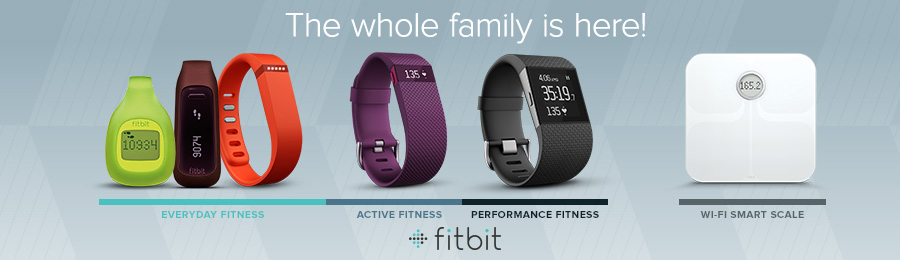
Here at Bing Lee, we’re excited to have the Fitbit range of fitness trackers in store now! Fitbit isn’t just about the amount of steps you take every day. Fitbit helps you monitor all of your activity, exercise, food, weight and sleep – so you’ll stay motivated and see how small steps will make a big impact. Let’s see how the trackers work with the app to help you achieve your health and fitness goals.

First we have the Flex, a slim, stylish device that will give you all the motivation you need to get out and be more active. Tracking steps, distance and calories burned, the row of LED lights show you how you’re stacking up against your daily goals, each light representing 20 percent of your daily goal. Then at night it tracks your sleep cycle, helping you learn how to sleep better and will even wake you silently in the morning.

Your Fitbit Flex doesn’t need to be tied to your smartphone 24/7 either – it will store up to 7 days of detailed data and up to 30 days of daily totals. So whether or not you have your phone in your pocket or at home, your Fitbit Flex will be tracking your movement.

The Fitbit Charge is a high performance wristband that delivers real-time fitness stats right on your wrist. The bright OLED display shows you steps taken, distance travelled, calories burned and more. You can glance at your wrist when your phone rings to see who is calling with the caller ID display feature. Like the Flex, the Charge will track your sleep and wake you with a silent, vibrating alarm so only you are woken up.

The Fitbit trackers work in tandem with the Fitbit app that is available on many iPhone, Android and Windows phones. It’s a powerful app that not only takes the data from your FitBit tracker but also helps visualise your daily fitness goals and enable sharing and competing.

You can set your goals on the Fitbit dashboard and track your progress through easy to read graphs and charts. You’ll also earn badges that reward step-based activities, floors climbed and weight goals that you can show off to your friends. And why not get them involved too, by sharing your stats and starting a group challenge. Then use the leaderboard to stay on track and use the friendly competition as extra encouragement.

The Fitbit app can also log your eating habits as well as workouts and weight. The more info you log, the more detailed analysis of your health and fitness progress Fitbit can give back to you.

Other models in the range Bing Lee carry include the pocket-ready Zip, the belt-clip ready One and the Aria smart scale that tracks weight, BMI, body fat and more, and recognises up to 8 different profiles on board, and keeps them private. The Aria data syncs back to your Fitbit app for goal setting and tracking.

As you can see Fitbit’s devices, dashboard and app work together to deliver a complete, connected and fun fitness experience. And now with multi-device support, your app will automatically detect when you swap from one device to another, making it simple to use your favourite Fitbit device for any occasion! So get on board now and start hitting those fitness goals!

SAMSUNG Large Capacity Washers

https://www.youtube.com/watch?v=Wwf30qmigyE

Large families means more, bigger loads of washing. The average Australian family does five point 3 loads of washing per week, that’s almost one load per day! Samsung’s new range of large capacity washers tackles massive laundry tasks with a choice of either top load or front load formats. Let’s check them out.

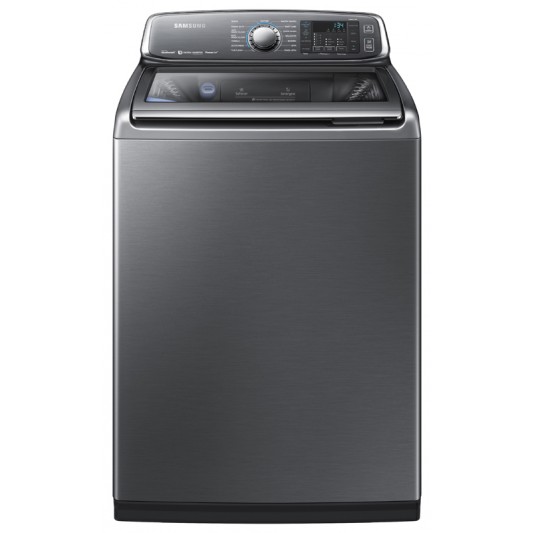
Anyone who does the washing at home knows there’s a lot more effort involved in doing the laundry than you might imagine. Samsung’s new activ dualwash top loader washing machine is more than just a washing machine, not only does it , can this handle up to thirteen kilograms , yes thirteen kilograms of washing – that’s a lot of , bed linen,towels, sporting attire and school uniforms.

BUT this unique washing machine also has its own built-in sink and tap – yes, you heard that correctly, where you can pre-treat your washing to ensure any heavily soiled stains are targeted! You can also use this to handwash your delicates, great for those with compact laundries. The water jet starts and stops the supply of water at the press of a button, Then when you’re done, drop the pre-treated clothes into the tub and start your regular cycle.

The magic detergent dispenser’s powerful vortex dissolves powder detergent and disperses it evenly, making sure there is none left in the machine. The inbuilt heater keeps the water at a constant temperature to release dirt and grime for the best possible clean.

The drum itself uses Samsung’s wobble technology by generating a dynamic and multi-directional washing flow, to avoid your clothes from getting tangled.  The machine is powered by Samsung’s digital inverter technology, using strong magnets for less noise and long term product durability. It can also reach spin speeds of up to one thousand Revs per minute exceptional for top loaders.

Other additional features include Samsung’s Magic filter, that catches lint and traps it in a special filter, this is positioned at the water level in order to filter the lint during the wash cycle.  The lint filter is easy to clean, by simply taking it out and rinsing.

The biggest washer in the Samsung new range is  a monster sixteen kilograms front loader, that can handle the equivalent to a team of Wallabies jerseys, on a selected wash cycle. This Extra Extra large  capacity washer features a bright eight inch colour LCD display that makes choosing your wash cycle a dream, delivering information on program options, settings and the current progress of your wash cycle!

And for those wet winter days when drying your washing is impossible, or if you live in an apartment that doesn’t have a clothesline, this machine can also dry up to eight kilograms. This is really convenient for drying bedding, towels or that outfit you want to wear last minute!

Lastly, this machine has smart technology with wi-fi, allowing you to  remotely control and monitor your washing machine from nearly anywhere, via your smartphone! Simply download the Samsung Smart Home app. For example, you can set an alarm to alert you when your wash cycle is complete, a great reminder for those with busy lifestyles!

That’s a taste of Samsung’s new ultra-capacity laundry range – smart, innovative, efficient and stylish,  providing you with the best care and clean possible!!.

SEAGATE Wireless Mobile Storage Device

https://www.youtube.com/watch?v=m_oUPRXnCXU

If you’re like a lot of people these days, you love your mobile devices, and of course you take them everywhere. Naturally you’ll pack it full of your favourite movies, music, photos and videos. Maybe your device needs a little help if it’s struggling to handle all of that content. The Seagate Wireless mobile storage device is here to help.

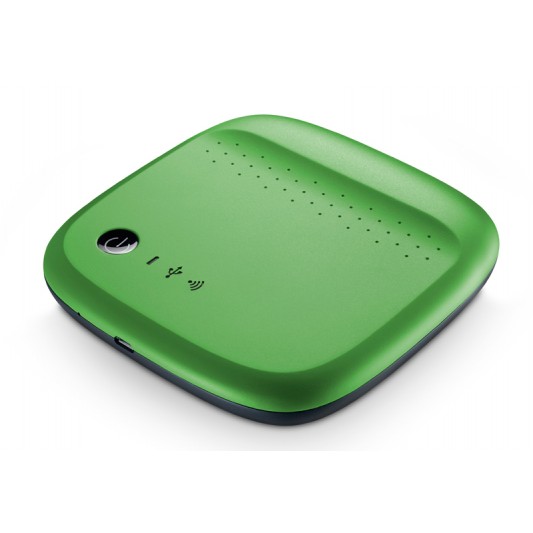
It’s a battery powered, wireless hard drive for your smartphone or tablet, which can be loaded up with everything you’ve got. The Seagate wireless holds hundreds of movies and thousands of photos and music tracks. With 500 gigabytes of capacity and a six hour battery life, you don’t have to worry about maxing out your device’s storage capacity or your data usage plan.

The Seagate wireless creates its own wi-fi signal so there’s no internet access required, so you can stream totally different content to three different devices, all at the same time. Seagate Wireless is compatible with heaps of systems including Android, iOS, airplay, chromecast and even Windows 8, which means you never have to leave anything behind.

So if you’re on a road trip with your family, you could have two different brand or type of tablet in the car and still have them connect to the Seagate Wireless for a mobile entertainment system to keep the kids distracted for hours.

You can also use your Seagate Wireless to back up any new content while you’re on the go, providing additional peace of mind for any new files you create.

So let’s see how this all works. First, connect the Seagate wireless drive using the supplied USB cable to your PC and drag and drop the files you want to take with you. It’s just like transferring to a standard hard drive.

On your mobile device, go to the Apple store or google play and install the Seagate Media app. Charge up your Seagate wireless drive, press the power button and wait for the wifi light to turn solid blue. Look for the Seagate Wireless access point on your mobile device’s wi-fi set up page and connect to this network. You are now connected and able to stream from the Seagate wireless.

Open the Seagate Media app and you’ll be able to see the media files that you can then stream, and remember three different devices can do this at once. The Seagate media app is actually a very useful file transfer app as well. You can upload files from your phone to the Wireless Drive, you can also download from the drive if you want to have it on your mobile device.

As you can see, with the Seagate Wireless drive, you don’t need to pick and choose what you can take with you on your business trip or holiday. Take it all, and share it with your friends and family.