Samsung XE500 ATIV Smart PC

Superseded by the new Samsung Ultrabook range.

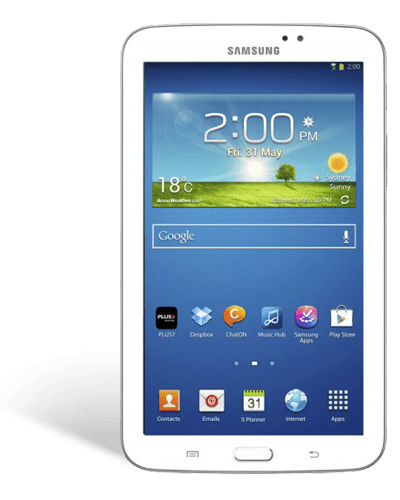
The XE500TC Ativ Smart PC is the new Windows 8 Slate PC from Samsung. Let’s unbox and have a close look at this mobile device.

Lets take the lid off and see what we have inside. On the underside we can see a layer of foam to protect the tablet during transport. Now the first thing we see in the box is the Infinity tablet, wrapped in plastic. Directly below it is the keyboard dock. After we take the dock out, we can see the small documentation slip including a user guide and warranty, along with a cleaning cloth. Underneath that we can see the power supply and USB cable which connects to the power supply unit and to a PC.

The ATIV Smart PC is a sturdy and solid Slate. At seven and sixty grams, it’s very portable, is only nine point nine millimetres in thickness.

Taking a look around the device we find the volume toggle and the micro HDMI on this side. On the top we have a headphone output, power button, rotation lock, a USB 2 port and micro SD card slot. On the other side we have the slot for the S pen – more on that later, and on the base there is the the dock port.

On the back we have an eight megapixel camera, and on the front we find a 2 megapixel camera that can be used with Skype and other video messaging services.

The display is an eleven point six inch LED with a thirteen sixty six by seven sixty eight 768 resolution, which pumps out 400 nits of brightness allowing for a great reading and viewing experience in pretty much any indoor and outdoor environment. The two speakers sit on the sides right near the edge of the slate, providing great front firing stereo sound. The Windows button positioned below the screen takes you back to the start screen in Windows 8.

Internally, the ATIV is powered by a specially designed dual core Atom chip for tablets and slates running at one point five GHz for quick response for apps and the OS. It features two gigabytes of RAM for superb multitasking, and a sixty four GB flash drive to hold all your documents and files. Of course with the Micro SIM card you can also expand your memory or easily transfer photos and other files to and from the ATIV.

If you want to share your content, it’s a cinch to use a HMDI cable to connect to your flat panel TV to show off your photos and movies.

The ATIV Smart PC provides up to fourten hours of battery life. To extend the functionality and productivity of your Slate, the included keyboard dock provides a notebook-like experience. With the addition of two additional USB ports you can add additional peripherals and storage just like a standard PC. And when you want to take it on the go, it’s easy to undock and take the screen portion by itself.

Along with the full functionality of a Windows 8 PC, the S Pen enhanced the touch screen experience by providing a pressure sensitive stylus that can be used to edit, create and sketch on the ATIV screen. Combine that with S note and you have a handwriting recognition program that will convert your scribbled notes into a more professional document that you can edit and then share with colleagues or save for future reference.

Lastly, because the ATIV Smart PC uses the full blown version of Windows, you can install all the third party Windows programs you’re used to using, or discover many more apps on the Windows store.

So if you’re looking for a full high definition, high performance tablet that provides the best of both worlds in play and work, then the Infinity is worth considering.

So come on in to your nearest Bing Lee store, or purchase online right now!

Westinghouse 90cm Oven Range

Superseded by the new new Westinghouse oven range.

The best thing about ninety centimeter ovens is they’re great for baking, grilling, and serving up a feast for family and unexpected guests. Westinghouse’s new ninety centimeter oven range has been designed locally, using experience and knowledge of the Australian cooking family. Not only that, they’re also manufactured right here in Australia as well.

Some of the things you might be thinking about about with such a big oven are heat up time, cleaning and having a oven that’s big enough to cater for everyone. Westinghouse have all those questions, and more, answered with this new 90cm oven range.

The new ninety centimetre ovens from Westinghouse feature touch control and fully programmable timers. This provides much more control when cooking. One of the most noticeable things you’ll notice right away is the size of the oven, with one hundred and twenty liters of gross capacity and one hundred and sixteen liters of usable space, setting a new benchmark for oven capacity.

To give you an idea of how large the oven is, you can comfortably fit up to four roast chicken and vegetable dishes in the oven, or up to 72 mini cupcakes in one go. That’s one huge family gathering or a sports team get together.

These ovens use two fans that rotate in opposite directions, which results in significantly better air flow distribution than a standard one or two fan oven. This is called the twin fan system. The oven is designed to heat up fast. How fast?

Well, on a quick cook setting, it takes only eight and a half minutes to heat the oven to one hundred and eighty degrees celsius. That means you can have the oven ready to cook with very little notice, a great feature if you do have unexpected drop ins.

The ceramic hob, with touch controls, makes it easy to use and also to clean. The fully programmable timer means you can plan your food preparation ahead of time, especially for slow cooked meals.

The oven has a large window for maximum visibility of the food while it’s cooking. It’s built with 3 layers of glass and a special door cooling system which keeps the door as cool as possible. That’s why these ovens don’t require a hot surface warning, so it’s much safer for families with young kids.

This oven is really versatile. It features seven shelf positions and come with catalytic liners. There is also a handy storage compartment, perfect for storing oven accessories and racks, for quick access when you need them. The kick plate also provides an integrated look for your kitchen.

Here, you can see the oven cavity is seamless. There are no awkward joints or dirt traps. The grill trays are actually split into two separate components, so you only need to clean what you use. The oven door is also easy to remove for cleaning, as are the layers of glass. Fingerprint resistant stainless steel means it’s easy to keep the oven looking great.

That’s the Australian made and designed Westinghouse ninety centimetre range, with electronic touch controls, one hundred and sixteen liter usable capacity, an effective twin fan system, fast heat up, triple glazed cool touch door, which easy to clean and maintain, not to mention having its own storage area. That’s definitely an oven made for modern families.

So come on in to your nearest Bing Lee store, or shop online right now.

Samsung Galaxy Tab2 7.0 Tablet

Superseded by the new Samsung Galaxy 3 range

The new Galaxy Tab2 7.0 is now in stores, and we’ve got one here to see what’s in the box and take a closer look at Samsung’s latest 7 inch Android tablet offering.

When we lift the lid off the box, we see the Tab2, with its plastic protective sticker. Lifting up the cardboard Tab, we can see the power supply, australian adapter, and USB cable. Over here we have the quick start guide and underneath is a set of personal headphones with different sized ear buds to help fit most ears.

The Tab2 7.0 weighs in at only 345 grams, is very easy and comfortable to hold in one hand, and is 10.5 millimeters thin. The natural way to hold this device is in the portrait mode.

It keeps its ports to a minimum, with the proprietary connection underneath used for both USB and PC connection, and for recharging via the power supply. There’s no buttons on either side, and the top area contains the power button, volume toggler, microSD card slot and headphone jack.

The back of the unit contains a 3 megapixel camera, and the front has a VGA camera for video chat services. At the front we also find the speakers for a front firing audio experience. As we know most tablets have the speakers at the bottom or at the back, so it’s good to see these have been placed where it makes most sense.

The screen is a 7 inch 1024 by 600 LCD, and is powered by a 1GHz dual core processor. It uses N wireless for fast internet access and Bluetooth for connection to keyboards and other wireless devices.

Samsung have made a few tweaks to the Android 4 operating system to make it easy to find and consume content, as well as commonly used apps.For example, the Tab2 7.0 allows you to unlock your device through face recognition instead of a password.

The S suggest app looks at popular apps on the Google Play network and suggests hot apps for you to try based on your app usage. You can even log in via facebook to see if your friends are suggesting or liking any apps. It’s another way to discover content and apps that you may not have otherwise. The S suggest also filters the apps to ensure they are compatible with your device.

All share play is another app that lets you take advantage of any DLNA-compatible device in your home. For example, you can push Tab2 movies to your big screen TV, or watch content that is on your PC.

Samsung hubs help you manage your content into easy to remember areas. Games Hub for gaming, Readers Hub for eBooks, and Music Hub for music.

Samsung’s Live Panel reveals commonly used tools for instant access no matter what you’re doing, like calculator, alarm, music player and task manager, making it even easier to multitask.

Being a Google Android device, you can customise your home page with widgets to deliver live feeds of your choice, such as weather, news, email and finance updates right there on the screen.

Audio and video format support is also quite extensive, with audio in MP3, FLAC, WAV and WMA, and video in MP4, WMV, MKV and AVI among the formats that can be played back without a third party app.

Samsung also include a heap of localised content as well, such as Channel 10, Reading Eggs, Quickflix, Good Food Guide and Magshop which has access to a huge range of Australian digital magazines. Of course, there is access to the Google Play marketplace as well for your own choice of apps.

The new Samsung Tab2 7.0 makes it easy and fun to consume your favourite content, and with heaps of Australian produced content and smarts to use with your existing devices at home, it’s a great option for your mobile lifestyle.

So come on in to your nearest Bing Lee store or purchase online right now.

Acer w510 Review Video

Transcription: The Acer Iconia W510 PC is the latest Windows 8 Tablet from Acer. Let’s unbox and have a close look at this mobile device.

Lets take the lid off and see what we have inside. The large upper compartment holds the protective leather pouch to use when you’re travelling. Beneath that is some documentation and the the Iconia W510 wrapped in plastic.Lifting the tablet out, there is another small box which contains a quick start guide and a cleaning cloth. The box to the side of the tablet contains the power supply, a micro to full USB adapter and a HDMI to VGA adapter.

The Iconia W510 is well designed with a white frame and powdered metal finish on the back. It weighs just five hundred and eighty grams and 9 millimeters thin.

Taking a look around the device we find a speaker on this side. On the top we have a headphone output, a lock switch and the power button. On the other side we have a mic, volume toggle, HDMI output, micro USB and micro USB slot and the completion of the speaker pair.

On the back we have an eight megapixel camera, and on the front we find a 720p webcam that can be used with Skype and other video messaging services.

The display is an 10.1 inch IPS LCD screen with a thirteen sixty six by seven sixty eight resolution,. The two speakers deliver great stereo sound. The Windows button positioned below the screen takes you back to the start screen in Windows 8.

Internally, the Iconia W510 is powered by a specially designed dual core Atom chip for tablets and running at one point five GHz for quick response for apps and the OS. It features two gigabytes of RAM for superb multitasking, and a sixty four GB flash drive to hold all your documents and files. Of course with the Micro SIM card you can also expand your memory or easily transfer photos and other files to and from the Iconia W510.

If you want to share your content, it’s a cinch to use a HMDI cable to connect to your flat panel TV to show off your photos and movies. Wireless connectivity to expand your sharing capabilities include high speed wireless capability, Bluetooth 4.0 and NFC for easy tap and transfer between NFC capable devices.

The Iconia W510 provides up to nine hours of battery life. Combine this with the stylish leather case and you have a tablet that can keep you up to date all day long without battery anxiety, and it will be safe from bumps or scratches while you’re on the go.

Because the Iconia W510 uses the full blown version of Windows, you can install all the third party Windows programs you’re used to using, or discover many more apps on the Windows store.

But the big news is that Acre are including a full version of Microsoft Office 2013 Home and Student so that you can be connected and productive from the moment you won your new Iconia W510. This includes a full licence for Word, Excel, Powerpoint and OneNote. Combining this with a skydrive account will let you update and create documents easily, and switch devices and seamlessly continue to use the latest versions of those documents.

Not only that, but The Iconia W510 also comes with a bonus Windows 8 starter pack valued at $150, including online tutorials, live coaching and priority helpline. What a great deal!

But wait… yes, there’s more! If you buy this Acer tablet before the end of August, you’ll also receive a bonus 1 year accidental damage cover directly from Acer, covering accidental drops, liquid spills and electrical surges. See in-store for more details.

So come on in to your nearest Bing Lee store, or purchase online right now!
New Bing Lee TV Ads Launch

We’ve had some great feedback about the ads we’ve been creating over the last few years – quirky, family oriented and memorable. We’re going live right now with the next batch of TV ads and thought it would be a good opportunity to expand on some of the messaging that we’re delivering on these new ads.

ADVERTISEMENT NO.1: “THEO”

Anyone that works at Bing Lee knows Theo, who helps run our Old Guildford Store below head office. Theo has been with us for 40 years and has seen many product categories come and go – Black and White TVs to Colour, to Digital and now “Smart”; computers go from desktops to touch screen tablets; and record players to mp3 players.

At the core of it, though, Theo is still ingrained with the same culture that he was taught the day he arrived at Bing Lee – to provide great customer service and provide great advice to help customers make the right purchasing decision. And ultimately, that’s what we hope all of our customer-facing staff deliver every time you step into a Bing Lee store.


ADVERTISEMENT NO.2: “THE WAREHOUSE”

You may not know this, but in addition to all the stock we carry and display in each our stores, we also have a central warehouse full of TVs, air conditioners, fridges, washing machines and other large products. This means that even if the item you’ve chosen at your local store only has display stock, we can still arrange delivery to your home from our warehouse, in some cases the next day.


ADVERTISEMENT NO. 3: “CHANGING PRICES”

 It’s a dynamic time we live in, and that applies to stores like ours that offer electronics goods. As the market shifts, we’ve committed to making sure we can offer the best of both worlds – great advice based on what you need for your lifestyle and situation, and competitive prices that are monitored on a daily basis.

With these new ads hopefully you get a feel for what we offer as a consumer electronics retailer – a friendly family-based in-store experience, backed up by a solid logistics system, and daily tracking of market prices so you can be assured of getting a great deal from us every day of the week.

Thanks for reading and have a great weekend. Here’s the collection of the new ads below:

Bing Lee Wins at Online Awards Event

This year, Bing Lee were the proud recipients of the award for Best Site Optimisation and Design at the recent ORIA event. This is very a humbling and exciting recognition from ORIA, which is the only awards event to recognise achievements in the e-commerce retailing segment.

As the recognised leader in design and optimisation, we are continually trying to make your online experience more enjoyable – and winning the award does not mean we’ll be sitting on our laurels to keep our site at the top of the pack.

So what does mean to you as a visitor to the Bing Lee site? Here are some of the highlights of our optimised site that hopefully will keep you coming back to us just as you might visit one of our local stores:

  • Site speed: whenever you click onto a product or other page on our site, we are dedicated to making sure that page loads up fast to deliver the information you’re looking for quicker.

  • Recommendations – as you visit the site, we’ll pick up what products you’ve been browsing and supply suggestions based on your browsing history. Hopefully you’ll see something that piques your interest!

  • Live chat: There’s nothing like being able to speak to a real person when you’re shopping, even when it’s online. Our live chat crew are based here at head office and are ready to take your inquiry.

  • User reviews: We’d love to hear what you think of the products we carry. Post your comments and share your thoughts on the latest appliance you purchased from us.

  • Filters: On the left hand side of the page, you’ll see many subcategories that help you focus your search down to a smaller subset of products. We want to help you find that product you’re looking for with minimal fuss and clicking.

  • Free delivery: We offer free delivery on a wide range of products when purchased online. Just check for the “free shipping” tag on products to see if your product qualifies.

  • We have regular sales and four day “Awesome Foursome” is being becoming quite the industry event. Sign up to our subscriber list for access to these regular promotions.

  • Product comparisons: If you want to see the difference between two or more products, just add a product to your comparison list. You can then see all the selected products and easily see the differences between the products you’re considering.

  • Product videos: We have a very active YouTube channel and we embed all our product and tutorial videos onto the related product pages. See how a products looks and what it can do before making your final buying decision.

As you can see, visiting the Bing Lee website is full of information and the little details that help make your online shopping experience more memorable and easier. Just like our stores located throughout New South Wales, we hope you come back to our online site again and again when you need help with your next appliance or electronics purchase.


New Products And A New Store for Bing Lee

The great thing about retail is there’s always new products released into the market. New tablets, pick up and go blenders, and sound bars to name a few, as we’ve seen lately! This week we’ll have a look at a few more products that have just arrived into our stores – as well as a… well, new store!

Samsung Curved OLED

Samsung Curved OLED: This new TV is a gimpse into the future of television screens. Available at the moment at the Alexandria store and due into more selected stores in the next few weeks, the Curved OLED represents the next leap in viewing technology. The self emitting diodes deliver the same intensity of LED panels, but because they are individual lights, blacks are the same as plasmas – so the total results is the richest colours you have ever seen on a screen.

The curved display is designed to immerse you in the content. The vision envelopes you so you feel almost part of the action, whether it’s sport or dramatic cinema. And even when the TV is turned off, it’s going to take the breath away from anyone that visits you. Style, bleeding edge technology and the best conversation piece in the street awaits you with Samsung’s curved OLED.


Yamaha Musical Instruments

Music: If you’re a regular customer of Bing Lee (and thank you if you are!) then you might have bought an audio system to play music, a tablet to watch music videos or a home theatre to bring concert DVDs alive. Now, you have the opportunity to create the music, with the introduction of music equipment in selected stores – Online, Alexandria, Balgowlah, Bankstown, Casula, Old Guildford, Penrith, Prospect and Rhodes stores.

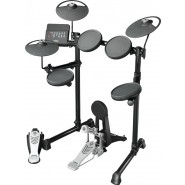
Whether you want to try serenading your loved one with the pluck of a guitar string or the tinkle of piano keys, or want to raise the roof with a rock-out with your mates, we have a range of selected musical instruments right here. With an electric guitar and amp pack, an acoustic guitar, two keyboards and an electronic drum kit, there’s enough gear to transform your whole family into the next Partridge family. If that’s your thing.


New Google Tablet

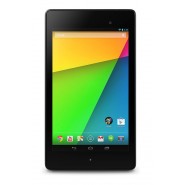
Nexus 7 (2013): Nexus is the name of the Google branded tablet and phone range. We’ve just received our first shipment of both the Wi-fi and 4G versions of the new Nexus 7, no name change but it’s the 2013 version. And it is a stunner: a 1,920 x 1200 screen on a bright, richly coloured 7” screen, you cannot discern pixels – it’s simply one of the best displays ever on a mini tablet.

Full support from Google means the latest updates to the operating system before any other manufacturer. You just have to try a full HD video to see how good this screen is. It comes pre-loaded with all the Google Services like Drive, Music, Books, Movies and Earth. Of course hundreds of thousands of apps are available from the Google Play store as well. Check one out online or instore today.


… And a new store for Bing Lee!

And last but not least, the latest addition to Bing Lee is not a product but a new destination to showcase all these products. We’ve opened a new store in Balgowlah, with our usual great range of products across TVs, computers, fridges, floorcare, cooking, laundry and more. It’s been fitted out with Small Appliances, IT and AV products on the top levels, and whitegoods, floorcare, fitness and cooking on the ground level. Come visit our friendly staff at the Balgowlah store now.

Have a great week!

3 Times The Fun With Samsung Galaxy Tab3

Tablets are fast taking over from notebooks in popularity when it comes to on the go computing, and Samsung has released its new tablet line up called the Galaxy Tab3 series, with three models in the range – a 7 inch, 8 inch and 10.1 inch. Let’s have a quick look at each, and the great features across entertainment, gaming and learning. Now, firstly take the tablet, feel how light and thin it is in your hand.

Galaxy Tab3 7″

The Galaxy Tab3 7 is a great, affordable tablet for reading ebooks and the spot of browsing and gaming when required. The thin and small design means it’s easy to carry with you in small bags or even in a large pocket. And being powered by Android, you have access to both the Google play and Samsung app stores for great content.

Galaxy Tab3 8″

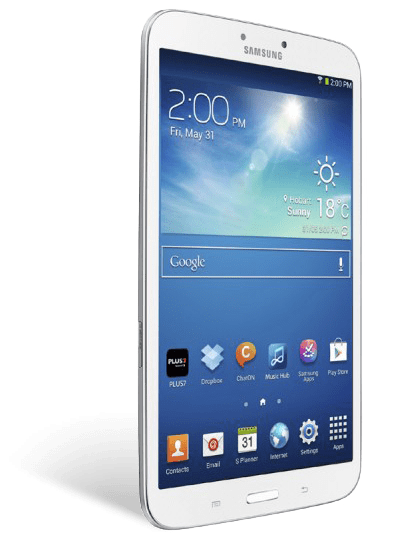
The Galaxy Tab3 8 has a larger screen but Samsung have done a great job with the design to make it feel really comfortable in the palm of your hand. One of the secrets is in how thin the side bezel is so your hand can still reach around the full width – and because it’s so light, just over 300 grams, you can hold for extending reading periods if you’re engrossed in an ebook for example.


Galaxy Tab3 10.1″

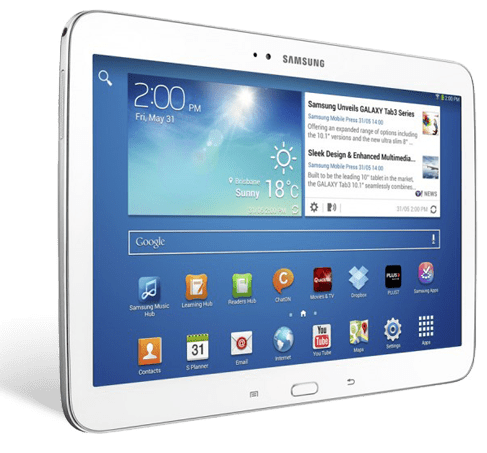
The Galaxy Tab3 10.1 is the best screen size for watching video content and playing full screen games. If you like to use your tablet on the go and share content with someone close, then the 10.1” screen is perfect for sitting side by side and playing two player games and watching your favourite shows.

All Tab3s have a widescreen display, so if you’re watching a movies or TV shows that have been produced recently, the video content will take up the entire display just like a TV. And while we’re on video watching, here’s a cool feature – if you want to continue doing other things like browse the net or check an email, you can use the video pop-up function to have the video at a smaller size sitting on top of other content.


The Galaxy Tab3 range have a Micro SD card slot for extra storage, so you’ll never be worried about what you can load onto your Tab3.

The Galaxy Tab3 range also has a back facing camera, and it comes with some easy to use shooting software to help choose the right settings for your situation – sports, beach, and fireworks amongst others. They all also have a smaller front camera for selfies but more importantly for video calls – so if you’re on a wi-fi network you can video chat face to face with friends and family – and being a tablet you can pass it around and everyone can have a go!

Watching TV shows or movies is not a singular experience anymore – whether it’s with your smartphone or tablet, chances are you are using a smaller mobile device to check out the official website of the show you’re watching, or checking out actor profiles, and posting and reading on social networks. The second screen is here to stay, and the Galaxy Tab3 can do all that, and more!

On the 8 and 10.1 inch versions of the tab3, there’s an infrared transmitter. It uses an app that can transform your tab3 into a remote control for your TV, so if you are doing the whole “second screen” thing, if you decide to change the channel or need it a bit louder, you just switch across to the app and control it right there – simple as that.

There’s another feature that will keep TV arguments to a minimum. Just say someone else wants to watch a DVD or Blu ray movie on the TV. On selected Samsung Smart TVs, if your TV and tablet are connected to the same network at home, you can use your Tab3 8 or 10.1 to watch free to air as if you had an antenna on the Galaxy Tab3! And you can still change channels and volume too.

All Galaxy Tab3s use the Android platform, so you’ll have access to hundreds of thousands and games, music, movies and books through Google Play. But in addition to that, Samsung has its own Samsung App store where it selects and offers only compatible apps for learning and entertainment to ensure you get the best tablet experience.

Here’s our video on the Tab3 range:

Kambrook Blitz2Go makes personal blending easy!

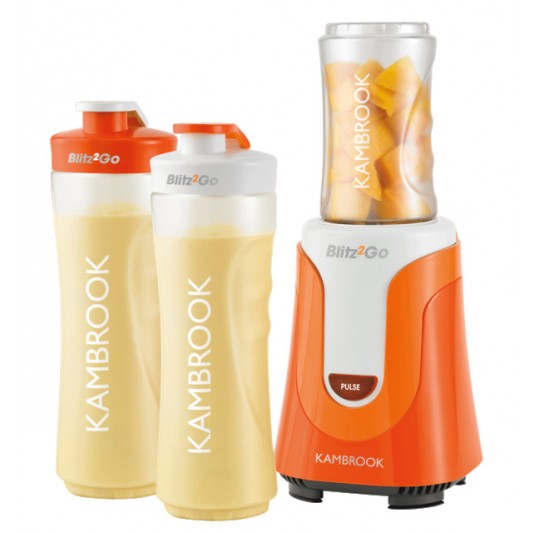
Here’s a product that has already flown off our shelves in the few days we’ve had it in stock – and you know it’s a winner when even our staff are clamoring to buy one. It’s called the Blitz2Go, and it’s… well, blitzing our stores even as I write this!

What’s the worst thing about blending something for yourself? I can actually think of a few things, including the washing up of multiple tools, the heavy lifting of the glass blender, and let’s face it, the wasted space of a large blender for a personal amount of ingredients.

These things may discourage you from blending the odd healthy drink now and then, unless you’re gung-ho about your diet and fitness. But for those that just want an easy way to blend fruit, vegies and even icy drinks, the Blitz2Go is a dream come true, for many reasons!

So here’s how it works. You put all of the fruit and perhaps vegies that you want to blend straight into the bottle, use the blender blade and screw it on, then turn upside down so that the bladed lid is inserted into the motorised base of the Blitz2Go. Press the pulse button and before long your ingredients will be blended. Then, you simply lift off the bottle, unscrew the blade lid and replace with the bottle’s drinking lid and that’s it.

I’d say that’s why the Blitz2Go has indeed blitzed it in terms of demand since it was released a few days ago. It’s a simple system without extra washing up – the bottle is the blender container! And you can imagine with a couple of extra bottles, you could make use of the fresh ingredients you bought, prepare a few more bottles’ worth and put them in the fridge for drinking at a later time.

Speaking of ingredients, here’s a recipe from the manual that’s included in the Blitz2Go package. There’s a whole set of different recipes to try; this one is called the Antioxidants Overload.

INGREDIENTS:

  • 6 strawberries, hulled
  • ¼ cup raspberries
  • ¼ cup blueberries
  • 70g red grapes
  • 125ml cranberry juice
  • 125ml pomegranate juice
  • 3 medium ice cubes

DIRECTIONS:

  1. Place the strawberries, raspberries, blueberries, grapes, cranberry juice, pomegranate juice and ice cubes into the 600ml bottle; securely attach the removable blade holder to the bottle.
  2. Secure the bottle onto the motor base and press the ‘PULSE’ button for 15 seconds or until smooth.
  3. Unscrew the removable blade holder and attach the drinking lid on top of the bottle.

Surprisingly simple, right? And with spring in the air and summer only a few months away, this is the best time to get healthy and looking good for the sunny times ahead.

Check out any Bing Lee store or you can purchase the Blitz2Go online right now.

Have a great weekend!

Sound Bars Explained

For the next 4 days (5th September to 8th September), we’re offering 15% of all soundbars online and instore – prices as marked. Here’s some information on Soundbars if you haven’t explored this option to enhance your entertainment setup.

If you’ve bought a large screen TV in the last few years, you would probably have been blown away by the image quality and design of the television. However, you probably weren’t so impressed with the sound coming out of the TV. And that is one of the compromises that comes out of such eye catching, slim designs.

If you’re looking for a more rounded cinematic experience, you could look at a full-blown home theatre system, but you may not want to have multiple speakers and wires, especially in a open plan area. This is where a soundbar may be your best option to enhance your movie watching experience while maintaining an uncluttered entertainment area.

Sound bars are really simply to set up. Sound bars should really be an extension of your TV, not the other way around, and this is really one of the mindset shifts that you need to make. Other systems like component receivers usually have all the inputs going into the receiver, bypassing the TV completely, and that is a more serious audio setup.

If you already have everything going into the TV, then all you need is to identify the audio output from the TV – it might be an optical output, or if it’s a newer TV, an HDMI output. This way, anything you watch on the TV, from free-to-air sports programs, music shows and broadcast movies to external sources like blu rays and DVDs, will have the audio passed from the TV to the sound bar.

Most sound bars now have a subwoofer as part of the package, and this really adds oomph to any images on your screen. Many models actually have a wireless connection from the main soundbar component to the subwoofer, so all the subwoofer needs is a connection to a powerpoint.

Another consideration is the actual location of your soundbar. Make sure you know the measured height of the TV from the base to ensure that the soundbar you are looking at fits underneath the bezel of your flat panel, to ensure you don’t block any of the image area, or indeed the infrared receiver to control your TV channel, volume and other menu functions.

Even if your flat panel is mounted on the wall, some soundbar models are also wall-mountable, complimenting your entertainment setup in a classy and eye catching way. The wireless subwoofer then finishes the setup with practically no visible wires.

One issue that many audio systems have is a visible delay in the audio matching of the audio and screen visuals. Most sound bars have a lip synching function to correct that phenomenon so that the screen and audio delivery is perfectly delivered.

Virtual surround sound provides an experience similar to what you might get with physical speakers, letting you experience the movie as the director and sound engineer intended, using the walls of the room to bounce sound so that it arrives to you from different directions. This delivers an even more refined sound space with just the front soundbar and subwoofer.

Bing Lee carries a full range of sound bars from LG, Panasonic, Samsung, Sony and Yamaha.

Every store has their soundbars powered and ready for you to listen to. Pop in to any store and see how a soundbar can dramatically change your movie, music and even casual TV viewing experience. Visit our Soundbar page to see our complete line up.

Have a great week!