What’s Hot This Week at Bing Lee?

Happy Friday to all our online visitors! Today we’re going to have a quick look at some of the brand new products that have just arrived in our stores across computers, home theatre and food preparation.

Toshiba P70 Notebook: If you’re looking for an absolute workhorse to replace your current desktop, then look no further! This 17.3” notebook features a fourth generation quad-core processor for extra grunt. The gigabit ethernet connection means the fastest fixed line internet connection and super fast wireless connectivity if you need to move it around the house.

The 2GB graphics card provides clear, jutter-free video entertainment when the lights go down, and impressive response to video and photo editing. The massive 1 terabyte hard drive will hold huge amounts of documents, music, photos and videos.


Yamaha YHT-799AU Home Theatre System: Speaking of connectivity, even home theatre systems are becoming smarter and more feature rich as well. The latest Home Theatre system from Yamaha features 5 x 115W speakers including two impressive tall boy speakers to immerse you in the cinematic action in your home.

The real smarts are in the receiver, with fixed ethernet connection to provide airplay for your Apple iDevices – imagine music coming from your iPhone thumping it’s way into the lounge room! It also has a large range of internet radio stations to choose from, and if you’re a Pandora music streaming user, you’ll be able to login via the receiver on-screen display and enjoy tailored playlists.

There’s some great future proofing here as well, with 4K pass through for latest Ultra High Definition content. 5 HDMI inputs and one output means you can use this as your home entertainment hub.

Electrolux Professional Stick Mixer: When you’re planning to cook a big winter meal, the first thing you’ll be reaching for is your mixer. The professional stick mixer from Electrolux, available now at Bing Lee, uses a triple blade for quick mixing and consistent results.

You can adjust the mixing speed and keep track of how fast it’s spinning with the handle’s blue LED indicator. The powerful 700W motor with turbo function creates a powerful vortex, sucking the ingredients in your container onto the blades, ensuring all the components are mixed evenly.

This stick mixer also comes with a double whisk attachment for fluffy, light textures. Plus, why use more mixing bowls than necessary? The anti-splash design means you can use the mixer directly in the pot, which reduces cleaning and preparation time.

Have a great weekend and look out for some great deals on the Clickfrenzy event next Tuesday!
Tablets – Which One to Choose

If you haven’t already joined the tablet revolution, chances are you will be soon. Tablets are quickly taking over as the preferred mobile device for casual gaming, web browsing, social networking, movie and TV show viewing ebook reading. But what are the differences between the different platforms? Let’s have a look at the main three.

Windows 8: Windows 8 tablets are a great companion to your desktop computer. Using Skydrive, you are able to synchronise your documents, photos and other files for seamless access at home, at work and at large. The operating system is built for touch use and status updates and other information refresh on the home page tiles, giving your screen a great at-a-glance appeal. One of the biggest appeals of the Windows 8 tablet range is the ability to load your own programs on the desktop mode, giving you complete flexibility to switch between the app-driven home page and the desktop area. This “fusion” of apps and productivity is what gives Windows 8 products its edge.

Android: Google’s operating system is famous for it’s flexiblity and complete customisation. Unlike Windows, which is more of a full operating system, Android is a much lighter and mobile phone-like experience. It’s easy to access common settings, set up widgets to see updated info, and extend your Android phone apps across to your Android tablet. Android tablets are wide and varied in hardware as well – from standard touch tablets, to ones with pens, to ones with keyboards. Google services form a huge part of the Android experience, with Gmail, Google Play, Google Plus, Google Drive, Google Maps and Google Now delivering a dedicated mobile experience across gaming, productivity, navigation and social networking.

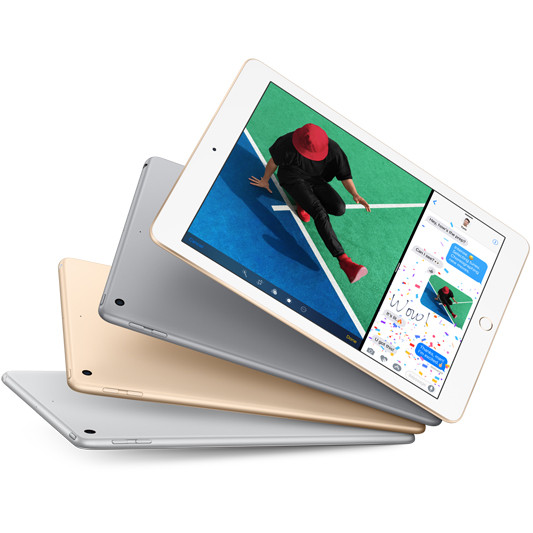
iOS: Apple can’t be faulted for vaulting the tablet market into the mainstream with the release of the iPad, and chances are if you are an iPhone user, then you would be looking to an iPad or iPad Mini as your large screen companion. If you’ve used iTunes and the App Store, then you can easily access apps you’ve already purchased, watch and listen to shows and music you’ve bought, and all under the same easy to use operating system as the iPhone. Even if you are a Google services user, if you’re inclined to look at the iPad you’ll be happy to know that most Google Apps are available in the app store and will sync with your Google Account.

As you can see, all three platforms have their distinct character and user experience – Windows with its familiar desktop and program ability, Android with its deep Google services offering and Apple’s iOS with it’s familiar and reliable interface and iTunes/App store content offering bar none. Have a great weekend!

What’s Hot This Week at Bing Lee?

At Bing Lee, it’s never a dull moment – our suppliers are always releasing new products and these last couple of weeks have been no different. So in case you haven’t been to one of our stores or browsed our site lately, here’s a few new products which have just made their way to our shelves, fresh from the manufacturer!

Samsung HWF-450 Sound Bar: We’ll be honest, big screen TVs look great, but if you’ve flicked from the news and weather to an action movie, you’re probably going to want sound with a little more oomph. The latest Sound Bar from Samsung takes all the wiring up hassles away because… well, there are no wires! The main unit connects to your Smart TV or other devices via Bluetooth, and because the Soundbar is designed to sit right underneath the TV there’s no issues with connectivity or signal strength. The Sound Bar then passes the low frequency sound to the wireless subwoofer for a superb rumble to compliment the audio spectrum – matching your immersive image with immersive sound. No wires, all cinema!


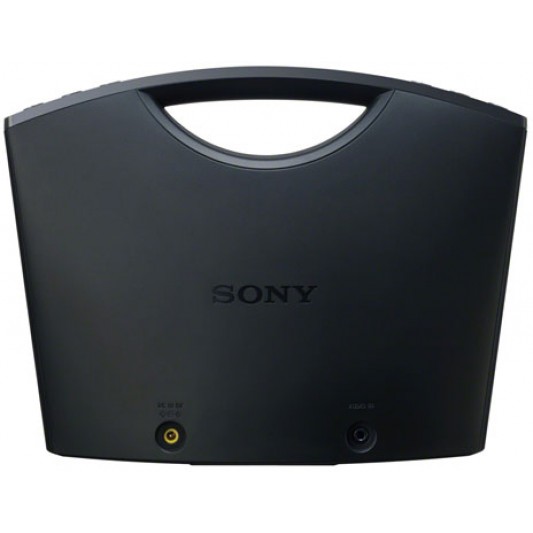
Sony SRSBTM8B Wireless Speaker – If you have a phone with NFC (Near Field Communication), then you will want to check out this portable speaker – simply touching the speaker while you have NFC activated on your phone will instantly pair the two devices and provide a bluetooth connection for sharing your music. And if your phone rings while you’re enjoying your playlist? Not to worry, you can actually take and make hands-free calls with the speaker as well. Simply insert 4 AA batteries for 20 hours talk and playing time, and your portable music session is good to go.


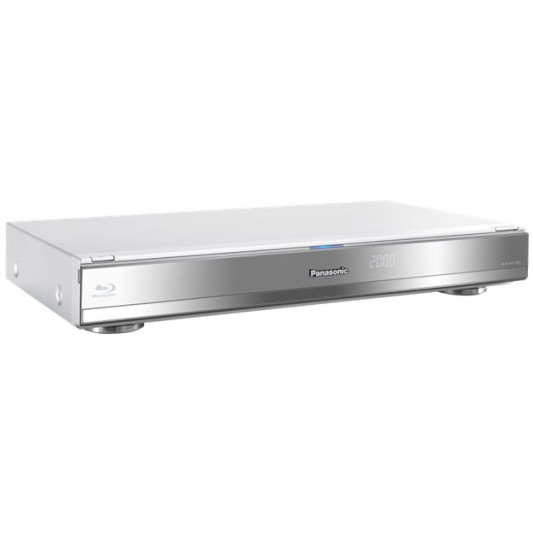
Panasonic DMRBWT835GL – you would have heard of Smart TV – how about a Smart Blu-Ray Recorder? Panasonic have snuck everything possible into this sleek looking player. It can play back, Blu Ray discs at Full HD, as well as record and playback Free To Air broadcasts up to Full HD. It comes with a 1TB drive that can hold up to 50, yes FIFTY days of full HD content. Being DLNA capable, it has a pretty special feature that allows it to stream from other devices, as well as share it’s content to your DLNA network. It also comes with ABC iView and Youtube video as well as other live reports of news and weather.


Have a great weekend everyone!

A Great Winter Feed with Breville’s All-in-One

As winter starts to really show its arrival with foggy mornings, dew-covered grass and a brisk bite in the wind, many of us would be thinking about warm dinners to fill us up at night. Soups are a great way to huddle in front of the TV or gather around the dinner table, and they can be very easy to prepare.

Soup meals can be a cinch to prepare, and can be as simple or as sophisticated as you’d like – throw in what you have in the kitchen pantry or fridge, or go out and select ingredients to make a specific dish. As with any dish, preparation is the key, and with Breville’s All-in-One, the path to a great tasting soup will be less messy and better textured.

So first, let’s have a quick look at what the All-in-One is all about, and how it can make food preparation easier, more consistent and help produce better cooking results:

http://youtu.be/9mKWzLakRGg

We spoke to Breville this week, who kindly provided a simple but tasty soup recipe – the trusty Leek and Potato Soup, which serves a family of four using the ingredient levels provided.

INGREDIENTS:

40g butter

1 tablespoon olive oil

2 leeks, thinly sliced

750g potatoes, roughly chopped

1 litre chicken stock

Salt and white pepper

Chopped chives, to serve

METHOD:

1. Heat butter and oil in a large saucepan, add leeks and cook, stirring, for 3–4 minutes until softened. Add potatoes and stock. Bring to the boil then reduce heat and cook, covered, for about 20 minutes or until potatoes are soft. Remove from heat and allow soup to cool slightly.

2. Place stick mixer into saucepan and blend until soup is smooth. Season to taste.

3. Serve soup topped with fresh chopped chives.

If the soup becomes too thick when cooking or blending add a little extra stock or water. And that’s it, a nice simple meal that you could add some hot bread or toast to for dipping.

But don’t just take our word for it, world-renowned chef Heston Blumenthal has also tried out the All-In-One, and is keen to show you how well the blender performs:

http://youtu.be/TkzchS55FgM

So there you have it – a simple but tasty soup recipe, a great product to help you prepare the dish, and the thumbs up from a famous chef. For more information on the BSB530 from Breville featured here, just click here to see more and even order online.

Have a great weekend, and enjoy your hot soup!

Samsung Series 8 Smart TVs – Your Entertainment Hub

Remember that movie with Tom Cruise called Minority Report? One iconic part of the film was the way Tom Cruise’s character used his hands to swipe the air to get information. At the time, that kind of technology still seemed to be fantastical. As we all know in the world of technology, things have a way of improving and developing at a rapid pace, and today, here we are with Samsung’s latest 8 series TV. In fact calling it a TV probably doesn’t do justice for what it can deliver in terms of content and interaction.

If you’re an avid watcher of free-to-air TV, then you will love the way this TV can help recommend shows that are currently airing on other channels or upcoming shows – and it does this based on learning your TV viewing patterns over time. You can use the TV to simply alert you, or help you set up recording these suggested programs using your own hard drive.

The 8 series takes TV discovery to the next level – you can ask it, with your voice, to help find shows you’re looking for. Whether it’s a genre like cooking or sport, or shows with particular actors, you simply use the Smart Hub remote and speak into it.

So let’s talk about that hand movement thing for a second, because on this TV, it works really well. I’m left handed and it recognised my gestures as easily as it would a right handed person. And you can do a lot with one hand on your Series 8 TV. Swipe between different panels of the TV, select and open apps, even change channels and adjust the volume.

As with all Smart TVs, you really need to have this connected to the internet to get the most out of it. And with Wifi built-in to the TV, it’s very easy to get this connected to your home’s wireless router. Once you have online connectivity, you can load in your Skype, Facebook, Youtube and Twitter passwords and get social from the comfort of your lounge.

Here’s a brief video highlighting some of the “smarts” of the Series 8 Smart TV. Click below for more details and to order online:

http://www.binglee.com.au/samsung-ua55f8000-55-series-8-3d-fhd-led-tv

Bing Lee Launches the Bing Lee Alive App

Today, Bing Lee takes the next step in using the latest technology to communicate to its customers with the Bing Lee Alive app, available to download via the Apple App Store or the Google Play store. Simply type in “Bing Lee Alive” in the search field of either store to easily find our app.

Whenever you see the Bing Lee Alive logo on our catalogue or in store, you’ll be able to unlock information on new products and chances to win great prizes. And it’s a cinch to actually use the app as well.

For example, on our latest catalogue you’ll see Bing Lee Alive featured on the front cover on the bottom banner and on the LG Smartwasher. All you have to do is start the Bing Lee Alive app, and the phone’s camera will activate. Press launch on the screen and hover over the Bing Lee Alive logo and a short video will start, taking you through the features of LG Smartwasher.

One of the great things is that the video is preloaded when you install the app, so you won’t have video quality issues when you playback and won’t be relying on a strong mobile network to stream the video – you can playback even if you have mobile data turned off.

Once the video is over, press the “win” button on the bottom right hand corner and you’ll be taken to a mobile-friendly web page where you can enter your details to win a great prize – in this case, one of the LG Smartwashers that was featured on the video. Over the coming months we’ll be showcasing lots of new and exciting products across home appliances, cooking, television and computers amongst many others.

Make sure you keep the Bing Lee Alive app up to date so that you’ll be able to check out the latest content and participate for your chance to win! Thanks for joining us in this exciting new communication platform for Bing Lee, we look forward to seeing you in-store and online soon! Here’s a quick visual guide to the app:

First, you can see the Bing Lee Alive logo on this page:


Next, here’s the Bing Lee Alive app loading:


Here’s the launch screen with the camera activated:


Simply press the launch button:


When you hover over a Bing Alive logo, a video will instantly come to life:

Turn your phone sideways for a full screen presentation.


Once the short video finishes, press the “win” button on the right lower screen:


Follow the instructions to enter our competition to win,. and good luck!


LG Smart Washer – A Really Smart Steam Clean!

If you’re part of a big family in your home, then chances are, you’ll have pretty big laundry loads. Whether it’s sports, business wear or night garments, there’s probably a big basket of clothes just waiting to be washed. The LG front load Smartwasher with steam might just be the answer to helping you get through your large, family-sized washing volumes.

The LG WD14070SD6 can handle a massive 10 kilos worth of dirty clothes and linen, and also manages to stay within a height of 900 millimeters. Why is this important? If you have an integrated kitchen/laundry, or a laundry room with integrated cupboards with room underneath for a front load washer, this washing machine will fit under a standard benchtop height. Normally it wouldn’t be possible, but this 10 kilo capacity washer will fit snugly in a smaller apartment or house where space is at a premium.

The stone silver colour of the GL SmartWasher will match the look of your stainless steel appliances, and mercifully also minimises fingerprints from messy fingers, young and old. The material is also very durable to withstand the rigours of daily domestic use. This will be even more important in a kitchen/laundry where your major appliances are always in plain sight.

This washing machine uses steam, which has the ability to puff up clothing material, letting the steam particles react with stains and lift finer dirt. Here’s a little trivia fact:, one drop of water is equal to 1600 particles of steam. Combining water and steam will dissolve detergent quicker, which will deliver a more effective wash. The steam function can be used to freshen up clothes as well. Put your previously worn clothes in the washer and select the Refresh Mode, and in 20 minutes you’ll have reduced creases and odours on your garments, giving new life to your previously tired looking clothes and saving a washing and ironing session.

Are you excited yet? Like many of us if you like to do your laundry at night time, then you will definitely appreciate LG’s Direct Drive. Instead of using belts and pulleys like on a standard washing machine, the Direct Drive actually fastens the drum directly to the motor. This system results in less noise, less vibration and increased durability – now that’s something you’d want in a domestic workhorse like a washing machine. The Direct Drive provides a really wide range of washing movements, resulting in a more natural, almost handwash clean.

There’s actually 6 different wash movements, which the washer will select based on the wash program you’ve chosen. As an example, the swing motion moves delicates smoothly under water. LG are so confident about their direct drive motor that they have put a 10 year guarantee on it. If you have young kids in your home, you’ll appreciate the allergy care mode, which combines steam and a customised wash cycle to remove plenty of household germs. The touchscreen LED helps you monitor time taken and the time to the end of the wash cycle. If an issue with the Smart Washer does occur, LG’s Smart Diagnosis feature will relay a 6 second sound to a call centre that you’ve contacted, who can then quickly identify what the problem might be. And the LG App available on Apple and Android devices will also provide feedback on the status of your washer or instant feedback.

Dashcam – The In Car Security Revolution

If you’ve ever had a prang, or come back to your car park spot after shopping to find an unexplained dent, then you’ve probably wished you could easily have captured the moment. Now you can, with a new kind of product called the “dashcam”.

Dashcams are in car cameras that allow you to retain video evidence of any incident on or around your vehicle. Think of it as a “black box” for your car. Dash cameras are quite inexpensive but can be very useful, and not just for recording accidents, a function which has provided Dashcams with the “crashcam” label. Let’s have a look at the different functions that a Dashcam could have, depending on their features.

Protection against fraudulent insurance claims: While we’re not suggesting that Dashcams are admissible in court or are recognised by insurance companies, merely having the record of an accident or minor collision are enough to deter would be fraudsters from making a false claim against you.

“Away from car” security: Some dashcams have proximity sensors, activating the dashcam recorder if it feels a bump or sudden movement even when it’s in standby mode. Like having home cameras, having a record of an incident while you are absent may help mitigate insurance issues.

Driving monitoring: If you wear a pedometer or a sports watch, chances are you’ll be more likely to walk or run further and keep looking at your performance. The same applies to dashcams – install this in your car and activate it when you’re lending your car to a younger driver, such as your teenage son or daughter, and it will be more likely that they will obey the road rules and drive in a more careful manner. Knowing that you will be able to observe their driving habits later will constantly remind them to drive safe.

Capture world events: In Russia, a meteor shower was captured by numerous amounts of dashcams, and were instantly uploaded to YouTube and broadcast around the world. You too can be part of this global phenomenon – you never know when something spectacular might happen right in front of your… well, dashboard!

It seems we’re living in a POV or “point of view” world and dashcams are part of that revolution. Join in now! Here’s a couple of products to check out if you’re interested: http://www.binglee.com.au/uniden-igocam800-accident-cam-vehicle-recorder http://www.binglee.com.au/uniden-igo-cam-300-accident-cam-vehicle-recorder

GoPro – Not Just For Extreme Sports

GoPro is the camera that has taken the world by storm. By now most of us would have seen the incredible first person perspectives of people jumping out of planes, skiing down incredible slopes and driving (and drifting) on the fastest race tracks. But as much as we would aspire to be that extreme sports person, not all of us are equipped, or have the desire to cheat death for a great YouTube video. But it doesn’t mean that we can’t use the GoPro in some creative ways.

We’ve heard some great stories of GoPros being strapped on pet dogs, or on our children’s heads while they run around. It’s actually interesting to see the world from a kid’s perspective – they seem to look up at the world and at us, a lot. In fact GoPro and action cameras in general, are one of the biggest growing camera categories.

The ability to simply capture, edit and share with very little hassle, along with the Facebook and YouTube services, has made the humble action camera a necessity for any traveller, bike rider, bush walker or anyone with an active lifestyle. So if you’re looking at a GoPro and wondering just how you would use it, here a short video of a new GoPro Hero 3 Silver Edition strapped to the top of a remote control car. Once the car is off and running, the low road perspective of the camera provides a unique view of the remote control car… and then you see some giant legs going past, and it all makes sense! The best way to watch this, and most GoPro content, is to watch in HD, so make sure you change the video quality to 720p or 1080p. For more information, visit http://www.binglee.com.au/gopro

Windows 8 Tablets – Windows On The Go

iPad, Android, Windows – these days there a multitude of options available when you are looking for a tablet PC. So which one is right for you? Today we’re looking specifically at the Windows tablet range, and what works well with these devices. The two Windows tablets we’re going to look at are the Asus VivoTab and the Samsung ATIV, both of which are great examples of the new generation of Windows devices. But first, a little refresher on Windows 8. There are two general types of Windows devices – ones that run Windows RT, and those that run Windows 8. The Windows RT models are very much like an iPad or Android tablet in that they run apps from their dedicated store, in this case the Windows store. On the other hand, any device, be it tablets, notebooks or desktops, that run on Windows 8, will have the same touch friendly environment and has the added benefit of being able to run all standard Windows-based programs. Now, here’s a little trick that you may not have known, but if you are a heavy iTunes user on your PC, it doesn’t necessarily mean you need to get an iPad to take your tunes and movies with you. Because both the Windows 8 tablets we’re looking at today run the full blown version of Windows, you can install iTunes on this tablet and download all your purchased content onto it, effectively turning it into a portable iTunes device, and could be an alternative to an iPad if you want to have your Windows documents and programs with you on the road. So here are two product highlights for two Windows 8 tablets. The first is the Asus VivoTab Smart, a 10.1” touchscreen with nifty features like HDMI output and NFC. Keep your eye out for more uses of NFC in the near future as more devices come with it built in. Soon you’ll be able to pay for things, transfer files and photos just by tapping the NFC area on your phone or tablet.

The second product is the Samsung ATIV Slate, which combines an 11.6” touchscreen with a keyboard dock, giving you the option to type away as you would on a notebook when you need to. This model would be a great choice if you needed to do a fair bit of document editing while you were away from your desk.

If you’re a heavy Windows user, and want the flexibility of a very mobile device that can also handle all the usual Windows programs you use day to day, then both the Asus and Samsung tablets are well worth considering.