WD Mycloud Personal Cloud Storage

http://www.youtube.com/watch?v=ruUTS4xQ8gM
Today I’d like to show you a new way to save and organise your digital life plus access your stuff from anywhere on any device. Introducing WD’s newest personal cloud storage offering, MyCloud.

Mycloud gives you complete control over your personal content, allowing you to keep it safe at home, yet always with you. Unlike public cloud solutions that either backup or store your photos, videos and files on a remote server, Mycloud keeps your stuff secure in your home network.

There are no monthly fees and you get terabytes, not just gigabytes of storage. Because 1 terabyte holds up to two hundred thousand photos or a hundred and twenty hours of video, and who can store all that with just gigabytes.

Mycloud also comes loaded with a dual core processor for the performance you need to stream media seamlessly, and transfer files without skipping a beat. It also has a USB three expansion port to add capacity to your personal cloud.

With MyCloud, it’s easier than ever to install and manage your personal cloud storage. To get started, simply plug your MyCloud to your wifi router. Download the My Cloud app and connect to the drive, that’s all you need to do to be up and running in seconds. The WD websitewww.wd.com/setup will walk you through more advanced features via step by step how to tutorials. Here you can also access all the software you need to support your My Cloud.

Once you are set up, it’s a breeze to save your stuff in one central location. Just drag and drop the files that you want to save on your personal cloud using the MyCloud app for your desktop. This app keeps your computer connected to your personal cloud no matter where you are, whether you’re on a mac or a PC. From your app you can easily manage and organise your files and share direct links to specific photos, videos, folders and even presentations via email either as a link to that file or folder or the file itself.

Backing up your data is extremely important. If your computer has issues, you know that the things that are really important to you are safe. Mycloud works seamlessly with your mac or PC computer to save and wirelessly back up your files on your home network.

For PCs, WD’s backup software, WD Smartware Pro, makes it easy to protect your personal content. Simply select the files you want to back up Select your Mycloud to back everything up to, and choose your backup schedule. It’s really that easy.

With the Mycloud dashboard you have a clear view of your drive’s status at anytime. You can also share your photos, videos and documents with family and friends, and customise how these users access your drive, so they only see the shared folders you want them to see.

Being able to access and see what important to you when you’re at home is ordinary. Being able to access and share those memories anywhere in the world is extraordinary. With WD’s free Mycloud apps, all your personal content on your drive is available to you on your smartphone or tablet wherever you are.

Once the Mycloud app installed on any iOS, Android or windows phone device, you can view your folders, share your photos with friends, watch a movie on your ipad, and stream your music library. If you’re going on a trip or even getting on an airplane, you can download files directly to your phone or tablet and watch them when you’re not connected.

Most of us take tons of video and photos on our smartphones and tablets which takes up a lot of memory on your mobile device. With the Mycloud app you can instantly free up space on your phone by directly uploading photos and videos directly to your drive at home.

If you’re a dropbox, sky drive or google drive user, you can access your account within the mycloud mobile app and share files between your cloud service and your own personal cloud. There’s no need to pay extra fees for more capacity. Get the most out of your public cloud and your personal cloud all on one device. Mycloud also works with other public clouds including google drive and skydrive.

There you have it, WD’s Mycloud is the newest personal cloud storage solution that keeps your media safe on your home network so you can access it anywhere on any device. You can protect your content with automatic file back up and free up space on your tablets and smartphones with the direct upload feature. Setup is as easy as 1-2-3

So come on in to your nearest Bing Lee store or purchase online right now.
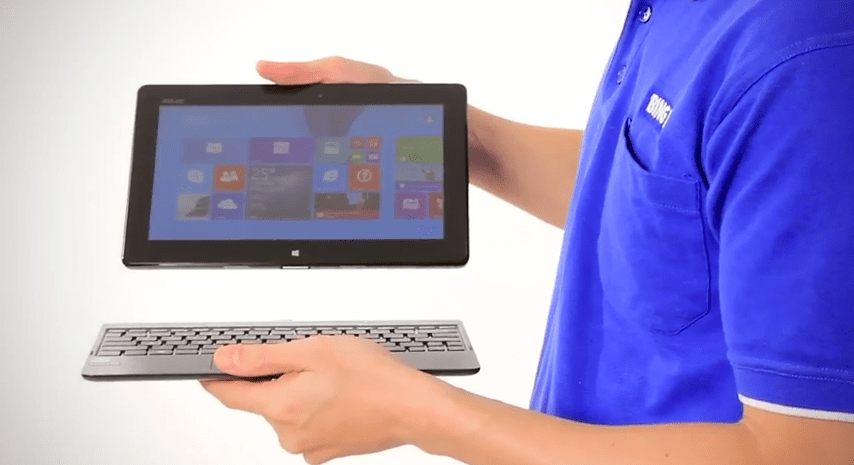
ASUS T100 Windows 8 Intel Powered Transformer Book

The T100 Transformer Book is the new Windows 8.1 convertible PC from Asus, powered by Intel’s new quad core processor. Let’s unbox and have a close look at this mobile device.

Lets take the lid off and see what we have inside. Now the first thing we see in the box is the tablet portion, wrapped in plastic. Directly below it is the keyboard dock. After we take the dock out, we can see the small documentation slip including a user guide and warranty. Underneath that we can see the power supply and USB cable which connects to the power supply unit and to a PC.

The Transformer Book is a well made device. At five hundred and fifty grams, it’s very portable, is only ten point five millimeters in thickness.

Taking a look around the device we find the volume toggle and a specific Windows button on this side. This takes you back to the start screen in Windows 8.1. On the top there’s just the power button, and on the other side we have a headphone output, micro USB and micro HDMI output. Up a bit further is the Micro SD card slot. On the front we find a 1.2 megapixel camera that can be used with Skype and other video messaging services.

The display is a ten point one inch IPS screen with a thirteen sixty six by seven sixty eight resolution, The two speakers sit on the sides right near the edge of the slate, providing great front firing stereo sound.

Internally, the Transformer Book is powered by a specially designed quad core Atom chip by Intel for mobile devices for quick response for apps and the OS. The new Intel system on a chip is specifically designed to deliver super fast response on mobile devices like this Windows 8.1 tablet, with better graphics and excellent power use.

The new Atom processor is a powerful mobile processor that is the little brother to Intel’s core range seen in larger notebooks. Whether it’s gaming, productivity or entertainment, having Intel Inside means you will have the best mobile experience.

The Transformer Book also features two gigabytes of RAM for superb multitasking, and a sixty four GB flash drive to hold all your documents and files. Of course with the Micro SIM card you can also expand your memory or easily transfer photos and other files to and from the Transformer book.

If you want to share your content, it’s a cinch to use a HMDI cable to connect to your flat panel TV to show off your photos and movies. The Micro SD card reader makes it easy to expand your storage and transfer files from other devices like a smartphone or camera.

The Transformer Book provides up to eleven hours of battery life. To extend the functionality and productivity of your Slate, the included keyboard dock provides a notebook-like experience. With the addition of an additional USB three port you can add additional peripherals and storage just like a standard PC. And when you want to take it on the go, it’s easy to undock and take the screen portion by itself.

Lastly, because the Transformer Book uses the full blown version of Windows 8.1, you can install all the third party Windows programs you’re used to using, or discover many more apps on the Windows store. Windows 8.1 allows you to make better use of the screen with improved multi tasking, an official Facebook app, and other in-built features like multi-window mail, improving productivity – and let’s not forget the return of the smart button for better desktop-based control.And for the ultimate in productivity out of the box, the Transformer Book comes with Microsoft Office 2013 Home and Student preloaded.

So if you’re looking for a great value, high performance tablet that provides the best of both worlds in play and work, then the Asus Transformer Book is worth considering.

So come on in to your nearest Bing Lee store, or purchase online right now!

Intel Ultrabooks

So you want power, and you want great design. You want fast start up, and you want long battery life. With our range of Ultrabooks powered by Intel’s Core i5 and i7 processors for Ultrabook, you’ll have the best of all worlds.

With Intel Ultrabooks, technology has caught up with your expectations to be ultra-responsive, and ultra-sleek. You won’t be sacrificing power for beauty, with the best blend of the responsiveness and smarts you expect and the portability and style you want. Powered by a smart Intel Core processor in a design that’s less than an inch thick and wakes up in a flash, a new Ultrabook lets you experience the joy of performance that keeps up with you as you create, explore, and enjoy what interests you most. You’ll rethink what’s possible as Intel did. The only question is, what will you do with it?

Let’s have a look at some of the great characteristics of Ultrabooks.

Ultrabooks are Ultra responsive. With Intel’s processors, superspeed USB, and the inclusion of solid state drives, Ultrabooks are able to read and deliver information in the blink of an eye, whether it’s browsing, calculating or replaying.

Ultrabooks are Ultra sleek. Being able to manufacture a notebook to this thinness means there’s huge potential for some very cool designs. As you can see, each brand delivers great looks that you’ll be aching to use at a cafe and around friends – you’ll want to be showing this off wherever you are. At less than an inch thick,

Ultrabooks wake up in a flash. This means you’ll always have the information you need at hand, and you’ll be able to fire off quick emails and check updates on your social networks or emails in an instant.

Ultrabooks run for hours and standby for days. You’ll be able to leave home or the office without a trail of power cables following your every move – you’ll be able to live the untethered lifestyle but without the bulk that a battery sometimes requires in a portable PC.

Ultrabooks deliver performance that keeps up with you. Whether you’re editing photos, converting and uploading video to Youtube or Facebook, or watching high definition video, Intel’s graphics system keeps the whole process smooth and buffer free – meaning you get the best experience no matter what tasks you’re currently completing.

Selected Ultrabooks feature Wireless Display, enabling you to throw your ultrabook’s image onto a wi-di enabled TV or monitor, enabling you to share your content up on the big screen with friends and family, or just for an entertaining night in.

Some fantastic innovations are coming through the Ultrabook range as well, with double sided screens, sliding ultrabooks, lie flat models and other fantastic product concepts to suit nearly any application.

Our range of Ultrabooks come with a choice of Core i5 and Core i7 processors.

Intel’s most popular family member, the Intel Core i5 processor delivers a great blend of responsive performance and stunning visuals.Effortlessly move between applications with smart multitasking delivered by Intel Hyper-Threading Technology. You’ll also enjoy the automatic burst of speed when you need it with Intel Turbo Boost Technology 2.0. Experience your movies, photos, and games smoothly and seamlessly with a suite of visual enhancements built into the processor’no extra hardware required.

For the most demanding tasks you’ll want an Intel Core i7 processor. With the best set of features, the Intel Core i7 processor is the ideal choice for whatever you want to accomplish on your Ultrabook.

That’s what Ultrabooks are all about, powered by Intel’s Core processors for Ultrabooks.

So come on in to a Bing Lee store, or purchase online right now!

Netgear R6300 Wi-Fi Router

If you own a tablet, smartphone or notebook, then you probably rely on a wireless network to use your mobile device online while at home. And if you have a family or live with friends then chances are that there will be lots of devices wanting to connect to your network.

The new R6300 Wi-Fi Router is aimed at making it easy for you, your family and your guests to connect their devices to your network to consume content, wirelessly print and at all times be secure.

This router is one of the very first routers to feature the brand new ‘AC’ standard, offering gigabit wireless transfer speeds. Devices that support the AC standard will begin to appear later this year, so it’s a great future proofing investment if you’re looking to upgrade your current router. The AC standard builds on the 5GHz band of the N wireless standard, and being a dual band router, the R6300 will be backward compatible with all your current wireless devices.

It used to be a real hassle to set up a router and make it secure from the moment you connect it. However this router comes preconfigured with an easily identifiable router name and password so you can connect your modem and have a secure wireless connection straight out of the box.

The WPS, or ‘push n connect’ feature lets you connect to any WPS capable device, for a quick and easy set up. At the same time if you have guests using your network, you can restrict them to just internet and prohibit access to your network drives and files.

Then there’s the Genie app, that gives you control over the router via your tablet, smartphone or notebook – no disc required. The Genie app helps you monitor usage, repair connection issues and control the router for password administration, router naming and other maintenance tasks.

The R6300 has two USB ports, which are powerful wireless tools in themselves. Plug in a hard drive storage device and that drive will be accessible through any other device connected to the network. If that content is music, video or photos, then you’ll be able to stream it to any DLNA device on your network. Plug a printer into the other USB port and that printer will be converted into a wireless printer for use with any computer on the network. The printer then also becomes an Airprint printer for use with iPhones and iPads.

Combining the Genie app with the DLNA functionality makes content sharing very easy. While on your smartphone use the Genie app to find content on your DLNA network, and then send that content from the hard drive to your DLNA Smart TV. All from the comfort of your couch.

The R6300 from Netgear does more than just connect you wirelessly to the internet – it takes wireless networking to a faster, smarter and more secure level, all the while preparing you for the next generation of wireless connectivity.

So come on in to your nearest Bing Lee store or purchase online right now.

Asus Tai Chi Ultrabook

Today we have the Asus TaiChi, a two screen hybrid notebook and tablet in one! Let’s take a look around the device.

With the lid closed, the Taichi looks like a reasonably slim notebook, and it weighs around the weight of an average Ultrabook.. Opening the lid reveals a keyboard that’s backlit when active and large, wide touchpad. It’s powered by a third gen Intel i5 or i7 processor, and uses a 128 gigabyte SSD drive. The processor is actually the same as those used in Ultrabooks.

Looking around the sides, we have a headphone and mic socket, USB 3 port and volume toggle. There’s also a switch here that prevents the lid screen from being accidentally turned on. A speaker grill sits just below the edge. On the other side there’s the power socket, another USB 3 port, micro HDMI and power toggle.

The notebook screen is an 11.6 inch 1920 x 1080 display, and text and images look very crisp and clear. There’s a 5 megapixel camera on the lid, and a high def camera capable of 720p video on the notebook side.

In notebook mode, the touchpad can be used to navigate different Window 8 functions, like charms, recents apps and managing open apps.

Now let’s look at the most intriguing aspect of this notebook – the touchscreen display on the lid. This can be used in three different ways, all through the blue light on the top row here, which controls the way the two displays work. Mode 1 is standard notebook mode, which basically is for using the TaiChi as a notebook, with the lid display not on at all.

Mode 2 is tablet mode, which you’d use with the lid closed, and activates just the top display. The lid screen is also a 1920 by 1080 IPS display, so rich colours and details are very apparent. Using both hands, you’d use your thumbs to swipe apps on the left, and open the charm bar on the right.

As it’s a fairly large tablet, there is a split keyboard for easy text input. The display can be rotated around and even in portrait mode for reading. The capacitive screen is smooth and responsive, and bright as well.

The next mode on the blue button is mirror mode. This displays whatever you’re working on, on the outward screen. This way, the display simply duplicates what’s on the monitor, be it a spreadsheet, or a powerpoint.

The third mode is the dual screen mode. This is an interesting mode where the lid screen becomes a kind of extended monitor, similar to how you would use extended monitor on a notebook, with the second monitor being used as an extension of the desktop space.

So, some applications here could be someone watching YouTube or a movie on one side, while another person works on a word document or spreadsheet on the other. In fact, we found that if the notebook display stayed within the desktop app, the person on the lid display side could do pretty much anything within the Windows 8 environment, use other apps, browse the internet.

So as you can see, the TaiChi from Asus isn’t just a tablet or notebooks, but offers enhancements in both productivity and entertainment. Using the desktop mode for the notebook side for work, closing the lid and using the touch screen for casual app use, and then using both screens to either share content or use simultaneously for different purposes show you how flexible the Taichi can be in your connected life.

So come on in to your nearest Bing Lee store, or purchase online right now!

Kobo Touch eReader

The is a great option for people that are interested in a device that’s easy on the eyes and has an easy way to purchase books. You can even take the whole library with you in one small and easy to use package.

When we take a look inside box we find the Kobo Touch on top, then a welcome guide and other documents underneath, the USB cable can be found underneath the cardboard tab. You’ll also notice that the Kobo Touch has a nice contoured backing for better handling and a better overall reading experience.

Reading on the Kobo Touch is just like reading a book, the text is all presented on the latest Pearl e-ink technology on a 6 inch screen. This means you can read for hours on end, and because power is consumed only on page turns, not when the text is displayed on the page, you can read your books for over a month before recharging…that’s correct for over a month.

Weighing in at only 185 grams you can hold it in your hand for extended reading periods.

When I mentioned a library on the Kobo, I meant just that – you can store up to 1,000 books on the Kobo as is, and even more via the Micro SD card slot, which can take up to a 32GB capacity card.

The Kobo touch is quite intuitive to use with its touch sensitive screen which opens up even more functionality. You can tap or swipe the screen to turn the page and you can highlight words to see their definition using the built-in Merriam-Webster dictionary. The virtual keyboard makes it easy to search the Kobo store for books you’re interested in. Speaking of the store, Kobo offers over two and a half million books, and a million free titles to get you started on your reading journey.

No matter what kind of reading style you like, you can customise the Kobo for your needs, with 7 different font styles, and 17 font sizes

The Kobo Touch is also Wifi capable, allowing you to browse the bookstore right from within the device, without having to be connected to a PC. This makes it easy to find the title you want and download it straight to the Kobo.

If you already own ebooks from other sources, you can easily transfer these to your Kobo via dragging and dropping from a PC or via a Micro SD Card.

Reading Life is a great way to track your own reading habits, with stats that tell you how long you take to read each book, how many pages you’ve turned, and how many books you’ve finished reading in your library.

With most everyone socially connected nowadays, Kobo have an integrated Facebook and Twitter function that allows you to share your reading interests with your friends, family and followers.

Kobo’s main focus is on the reading experience. However with touch control, a customised display, ease of buying and transferring titles, and the ability to share your reading experience with your social networks just enhanced the total Kobo package.

So come on in to your nearest Bing Lee store or purchase online right now.

Asus F202 Windows 8 Touchscreen Notebook

The new F202 Windows 8 notebook from Asus is a great example of a full Windows 8 experience at an affordable price. Let’s take a closer look.

The F202 is only 2.1 centimetres in height, and weighs 1.3 kilos, making it a device that you can definitely take with you anywhere in a small bag or satchel. The design is inspired by the aluminium casing of the Zenbook series for a premium look and feel. The sides are lined with a shiny metallic finish to highlight the various ports available, and the front is slightly extended for easier lid opening.

On the right hand side we have an SD card slot, microphone and mic input, USB 2 port and VGA port. On the opposite side we have the power supply socket, full sized ethernet port, HDMI output, USB 3 port, USB 2 port and a Kensington lock.

Opening the lid and we see the island keyboard set deep in the base surrounded by more smart looking metallic surfaces. Below the keyboard is a single panel touchpad, which can be used to control the Windows 8 environment. For example, swipe in from right for charms, in from the left for apps and from the top for additional features..

The multi-touch screen panel is a thirteen sixty six by seven sixty eight pixel resolution, providing a crisp eleven point six inch display. Above the screen is a webcam for use in video chat applications.

The F202 is powered by a 1.1 GHz Intel Celeron chip with enough grunt to get through all your basic daily activities like email, web browsing and using Windows 8 apps. The integrated Intel HD 3000 graphics provides additional power to make your movie and video viewing a pleasure as well.

The F202 comes with 320GB of storage on board, so you’ll have plenty of space to fit your documents, photos, music and movies so you can be entertained on the go. And when you want to share the items on your F202, you’ll be able to simply connect to a flat panel TV with a HDMI cable using the HMDI output. Transferring files to and from is ultra fast as well, with the USB 3 super speed port providing up to ten times the speed of a USB 2 connection.

Whether you’re at home or out and about, the wireless connection on the F202 lets you stay up to date and in contact using the wireless b, g, and n standards.

Having a touch screen on such an affordable notebook is a great feature, as you’re able to use Windows 8 to its fullest, with pinching, zooming, swiping to change apps, and selecting hyperlinks.

Asus have also included their own set of apps to kick you off as well, including a world clock, scientific calculator, measurement converter, webcam software, and customised power settings, all designed to help you get more out of your F202 notebook.

If you’re unsure how to use Windows 8, there’s no need to fret. Asus have even included an on board Tutor to help you get started on the basics, and soon you’ll be using Windows 8 like a Pro.

Whether you’re a student or need an affordable notebook for work and play on the go, the F202 from Asus with touch screen and Windows 8 is definitely one to consider.

So come on in to your nearest Bing Lee store or purchase online right now.

Samsung Galaxy Tab2 10.1 Tablet

Superseded by the new Samsung Galaxy 3 range

The new Galaxy Tab2 10.1 is now in stores, and we’ve got one here to see what’s in the box and to take a closer look at Samsung’s latest Android tablet offering.

When we lift the lid off the box, we see the Tab2 10.1 with its plastic protective sticker. Lifting up the cardboard Tab, we can see the power supply, australian adapter, and USB cable. Over here we have the quick start guide and underneath is a set of personal headphones with different sized ear buds to help fit most ears.

This Tab2 10.1 weighs in at 581 grams, is easy enough to hold in one hand, and is 9.7 millimeters thin. The natural way to hold this tablet is in the landscape mode.

It keeps its ports to a minimum, with the proprietary connection underneath used for both USB and PC connection, and for recharging via the power supply. There’s no buttons on either side, and the top area contains the power button, volume toggler, microSD card slot and headphone jack.

The back of the unit contains a 3 megapixel camera, and the front has a VGA camera for video chat services. At the front we also find the speakers for a front firing audio experience. As we know most tablets have the speakers at the bottom or at the back, so it’s good to see these have been placed where it makes most sense.

The screen is a 10.1 inch 1280 by 800 TFT LCD, and is powered by a 1GHz dual core processor. It uses N wireless for fast internet access and Bluetooth for connection to keyboards and other wireless devices.

Samsung have made a few tweaks to the Android 4 operating system to make it easy to find and consume content, as well as commonly used apps.

The S suggest app looks at popular apps on the Google Play network and suggests hot apps for you to try based on your app usage. You can even log in via facebook to see if your friends are suggesting or liking any apps. It’s another way to discover content and apps that you may not have otherwise. The S suggest also filters the apps to ensure they are compatible with your device.

All share play is another app that lets you take advantage of any DLNA-compatible device in your home. For example, you can push Tab2 movies to your big screen TV, or watch content that is on your PC.

Samsung hubs help you manage your content into easy to remember areas. Games Hub for gaming, Readers Hub for eBooks, and Music Hub for music.

Samsung’s Live Panel reveals commonly used tools for instant access no matter what you’re doing, like calculator, alarm, music player and task manager, making it even easier to multitask.

Being a Google Android device, you can customise your home page with widgets to deliver live feeds of your choice, such as weather, news, email and finance updates right there on the screen.

Audio and video format support is also quite extensive, with audio in MP3, FLAC, WAV and WMA, and video in MP4, WMV, MKV and AVI among the formats that can be played back without a third party app.

Samsung also include a heap of localised content as well, such as Channel 10, Reading Eggs, Quickflix, Good Food Guide and Magshop which has access to a huge range of Australian digital magazines. Of course, there is access to the Google Play marketplace as well for your own choice of apps.

The new Samsung Galaxy Tab2 10.1 makes it easy and fun to consume your favourite content, and with heaps of Australian produced content and smarts to use with your existing devices at home, it’s a great option for your mobile lifestyle.

So come on in to your nearest Bing Lee store or purchase online right now.

Trend Micro Maximum Protection

Online security has never been more important, given the amount of time we spend on not just our computers, but also our smartphones and tablets. After all, the three things we’re doing online the most these days are browsing the internet, reading and writing emails, and connecting with our friends and family through social networks. With Trend Micro’s Maximum security, you’ll be protecting yourself on multiple platforms and devices.

Maximum Security provides a license for up to 5 devices, across Windows, including Windows 8 PCs and tablets, Macs and Android tablets and smartphones. You can assign the licenses according to the devices you have in any combination.

So let’s check out some of the powerful features that Maximum Security provides.

AntiVirus is still the most important aspect of any security package, and Trend Micro’s Titanium console gives you the control and reports in an easy to read format. You can run instant anti-virus scans, see how secure your PC is right now, and see reports on what viruses have been stopped in their track and whether they were web-based or localised viruses and spyware.

Now, the social network protection is invaluable now that we spend so much time on Facebook and Twitter. How do you know what links are safe to click on, especially if it looks like an interesting link and your friend has shared it with you?

Titanium scans your facebook wall or twitter feed, and provides a guide for what links are safe to visit. Green means safe, those that might be unsafe are highlighted in red. You can also then warn your friend that their link is potentially malicious to give them the chance to take it off their wall, and therefore off all their friends feeds.

If you have an expanded online social life, you’ll be glad to know that this feature also extends across Google plus. linkedin, pinterest and myspace amongst others.

Navigating privacy controls in Facebook can be a little daunting as well. Titanium Maximum protection helps you set your privacy controls to the level you want, and even makes suggestions on what to change to optimise your privacy level. We’ve all accepted friend’s requests to play games and join other apps on Facebook, and Trend Micro helps you control what apps have access to your private information.

Maximum Security is also working hard in the background to ensure your online and email activity is protected as well, by blocking unsafe web pages, blocking links and attachments in emails, and letting you know what web pages might be unsafe.

Trend Micro also offers a raft of other features, like parental control, remote data locking, 10 gigabytes of secure online storage, and secure erase that doesn’t just deletes a file but wipes it completely from the directory of a PC.

As you can see, with Trend Micro’s Maximum Security, you can be safe in the knowledge that your browsing, emails and social networking will be protected and secure.

So come on in to your nearest Bing Lee store, or purchase online right now.

Samsung XE500 ATIV Smart PC

Superseded by the new Samsung Ultrabook range.

The XE500TC Ativ Smart PC is the new Windows 8 Slate PC from Samsung. Let’s unbox and have a close look at this mobile device.

Lets take the lid off and see what we have inside. On the underside we can see a layer of foam to protect the tablet during transport. Now the first thing we see in the box is the Infinity tablet, wrapped in plastic. Directly below it is the keyboard dock. After we take the dock out, we can see the small documentation slip including a user guide and warranty, along with a cleaning cloth. Underneath that we can see the power supply and USB cable which connects to the power supply unit and to a PC.

The ATIV Smart PC is a sturdy and solid Slate. At seven and sixty grams, it’s very portable, is only nine point nine millimetres in thickness.

Taking a look around the device we find the volume toggle and the micro HDMI on this side. On the top we have a headphone output, power button, rotation lock, a USB 2 port and micro SD card slot. On the other side we have the slot for the S pen – more on that later, and on the base there is the the dock port.

On the back we have an eight megapixel camera, and on the front we find a 2 megapixel camera that can be used with Skype and other video messaging services.

The display is an eleven point six inch LED with a thirteen sixty six by seven sixty eight 768 resolution, which pumps out 400 nits of brightness allowing for a great reading and viewing experience in pretty much any indoor and outdoor environment. The two speakers sit on the sides right near the edge of the slate, providing great front firing stereo sound. The Windows button positioned below the screen takes you back to the start screen in Windows 8.

Internally, the ATIV is powered by a specially designed dual core Atom chip for tablets and slates running at one point five GHz for quick response for apps and the OS. It features two gigabytes of RAM for superb multitasking, and a sixty four GB flash drive to hold all your documents and files. Of course with the Micro SIM card you can also expand your memory or easily transfer photos and other files to and from the ATIV.

If you want to share your content, it’s a cinch to use a HMDI cable to connect to your flat panel TV to show off your photos and movies.

The ATIV Smart PC provides up to fourten hours of battery life. To extend the functionality and productivity of your Slate, the included keyboard dock provides a notebook-like experience. With the addition of two additional USB ports you can add additional peripherals and storage just like a standard PC. And when you want to take it on the go, it’s easy to undock and take the screen portion by itself.

Along with the full functionality of a Windows 8 PC, the S Pen enhanced the touch screen experience by providing a pressure sensitive stylus that can be used to edit, create and sketch on the ATIV screen. Combine that with S note and you have a handwriting recognition program that will convert your scribbled notes into a more professional document that you can edit and then share with colleagues or save for future reference.

Lastly, because the ATIV Smart PC uses the full blown version of Windows, you can install all the third party Windows programs you’re used to using, or discover many more apps on the Windows store.

So if you’re looking for a full high definition, high performance tablet that provides the best of both worlds in play and work, then the Infinity is worth considering.

So come on in to your nearest Bing Lee store, or purchase online right now!